
Time Blocking for Students: How to Plan Study Time That Actually Happens
“I’ll study tonight” is one of the least reliable plans a student can make. Tonight fills up with dinner, messages and one more episode, and the essay moves to tomorrow again. Time blocking fixes that by giving every study session a real slot in your week, the same way your classes already have one.
This guide shows you how to time block a student week, with an example schedule, study block lengths that work and a revision plan for exams. If you are new to the method, our beginner’s guide to time blocking covers the basics.
Quick answer: To time block as a student, start with a weekly view, add your classes and fixed commitments first, then give each subject its own study blocks in the gaps. Plan around deadlines with DO dates, keep each study block to 25 to 90 minutes with breaks, and review your week every Sunday. A free time blocking template makes it easy to start.
Why Time Blocking Works for Students
- Your week already has a frame. Classes and labs are fixed blocks. Time blocking just fills the gaps on purpose instead of by accident.
- It beats procrastination. “Study history” is easy to put off. “History reading, Tuesday 2 to 3 pm in the library” is a plan.
- It shows you when you are overloaded. If your study blocks don’t fit before a deadline, you find out on Sunday, not the night before.
- It protects your free time. When study has a place, the rest of your evening is actually free, without the guilt.
How to Time Block Your Student Week in 5 Steps
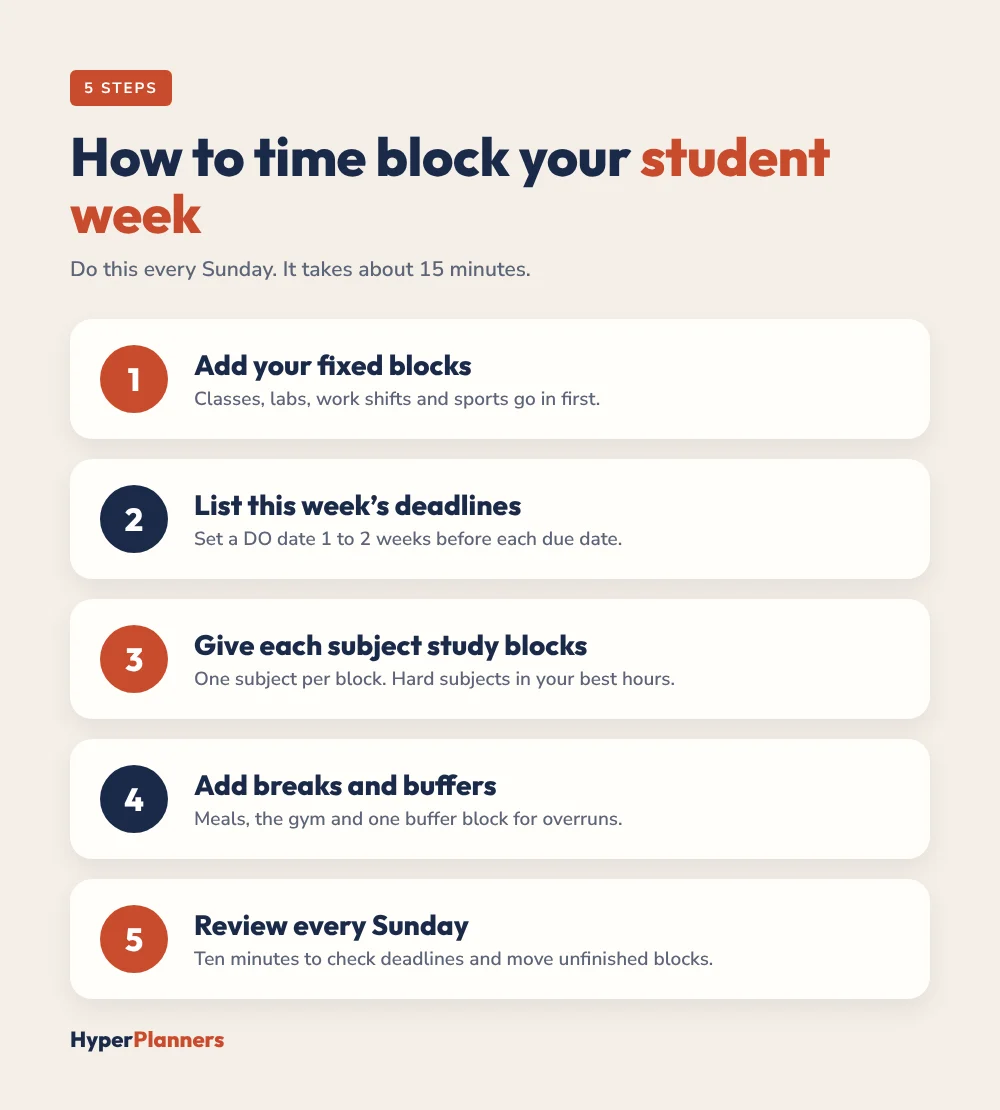
- Add your fixed blocks. Put classes, labs, work shifts, commutes and sports on your weekly page first.
- List this week’s deadlines. For each assignment, set a DO date, the day you will start, one to two weeks before it is due.
- Give each subject study blocks. Fill the gaps between classes with study blocks, one subject per block. Harder subjects go in your best-energy hours.
- Add breaks and buffers. Leave time for meals, the gym and a buffer block for anything that runs over.
- Review every Sunday. Spend ten minutes checking next week’s deadlines and moving any unfinished study blocks.
Our free student planner has a deadline tracker with DO dates and an exam countdown that pairs well with this method.
Example: A Time-Blocked Student Day
Here is what a simple, realistic weekday can look like with two classes:
| Time | Block | Type |
|---|---|---|
| 8:30 to 9:00 | Breakfast, check today’s Top 3 | Planning |
| 9:00 to 10:30 | Biology lecture | Class |
| 10:45 to 12:15 | Essay draft, history | Study (deep work) |
| 12:15 to 1:15 | Lunch with friends | Break |
| 1:15 to 2:45 | Statistics seminar | Class |
| 3:00 to 3:50 | Statistics problem set | Study |
| 3:50 to 4:30 | Buffer, email, admin | Buffer |
| 4:30 to 6:00 | Gym or part-time job | Fixed |
| 7:30 to 8:15 | Review notes from today | Study (light) |
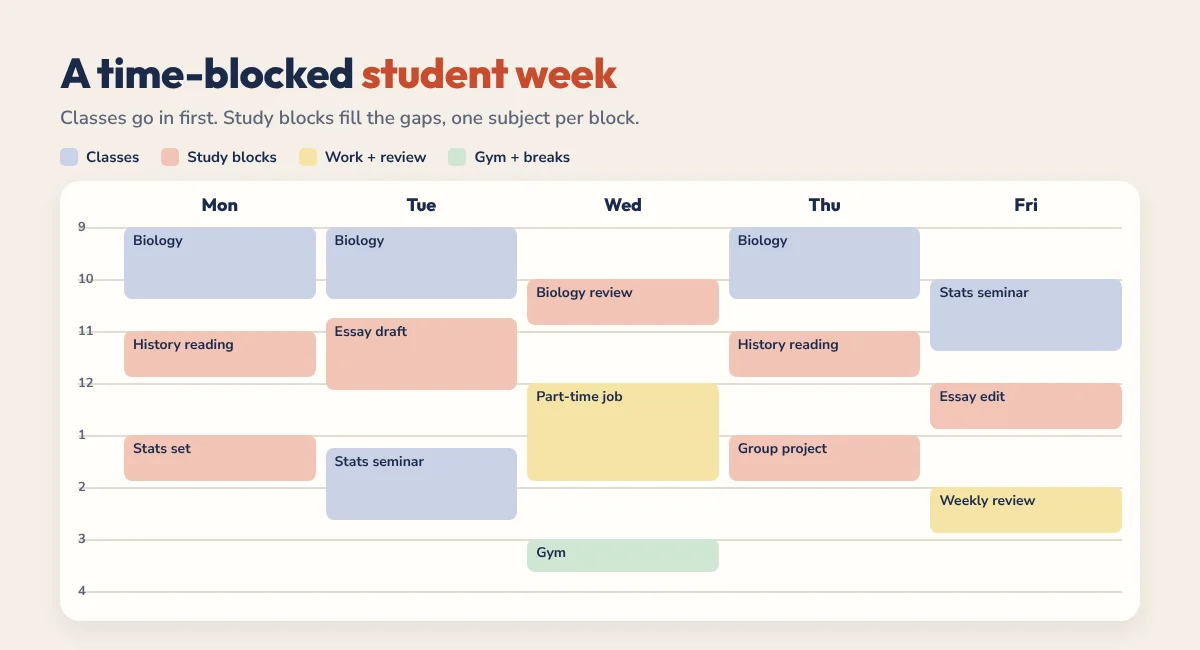
Notice that the hardest task, the essay, sits in the morning straight after class, when energy is still high. The evening block is short and light on purpose.
How Long Should a Study Block Be?
There is no single right answer, so test these three and keep what works:
- 25 minutes: the Pomodoro length. Great for getting started on something you are avoiding, with a 5-minute break after each one. See Pomodoro vs time blocking for how to combine the two.
- 50 minutes: a good default for reading and problem sets, with a 10-minute break.
- 90 minutes: for deep work like essays or projects. One or two a day is plenty.
It also helps to spread study out. Several shorter sessions across the week tend to stick better than one long cram, so two 50-minute blocks on Monday and Thursday usually beat four hours on Sunday night. Time blocking makes that spacing easy, because you can see the whole week at once.
Whatever length you choose, give each block one subject and one clear task, like “Read chapter 4 and make notes”, not just “Biology”.
Time Blocking for Exam Season
Exams are where time blocking pays off most. For a full revision setup, see our study planner guide. Work backwards from each exam date:
- Count the days. Write every exam date into your planner and count back three weeks.
- Split each subject into topics. List the topics you need to revise for each exam.
- Assign topics to blocks. Give each topic one or two revision blocks across the three weeks, mixing subjects so you don’t spend a whole day on one.
- Add practice blocks. Leave the last week for past papers and practice questions.
- Keep a rest day. Block at least half a day off each week. Tired revision is slow revision.
Student Time Blocking Tips
- Use your gaps. A free hour between lectures is perfect for one focused study block.
- Study where you study. Attach a place to each block, like the library or a quiet café, so you are not deciding on the spot.
- Block group work early. Agree on group project times at the start of the week, before calendars fill up.
- Protect sleep. Don’t block study after midnight. It almost never goes as planned.
- Don’t plan every minute. Leave evenings and weekends partly open, or the plan will feel like a cage. For more ideas, read our time management tips for students.
Time Blocking With ADHD as a Student
Strict schedules can be hard to keep with ADHD. Try loose blocks instead: put study tasks into parts of the day, like “after lunch”, rather than exact times. Our ADHD digital planner for college students guide and our time blocking for ADHD guide go deeper.
Paper, Digital Planner or Calendar?
Many students use a calendar app for classes and a digital planner for study blocks. If you plan on a tablet, our time blocking on iPad guide shows the full setup in GoodNotes. Still choosing a planner? See the best digital planner for university students.
Tired of re-planning blocks by hand? See how Reclaim.ai for students with ADHD schedules study blocks automatically, plus how to get its 50% education discount.
Want a printable version? Download our free weekly study planner template (PDF), with two study blocks a day and a deadlines table.
Time Blocking for Students FAQ
How do students use time blocking?
Students add classes and fixed commitments to a weekly plan first, then give each subject its own study blocks in the gaps. Each block has one subject and one task, and the plan is reviewed every Sunday.
How many hours should a student study per day with time blocking?
It depends on your course load. Many students do well with two to four focused study blocks a day outside class, plus more during exam season.
Is the Pomodoro technique the same as time blocking?
No. Time blocking decides when you work on each task. The Pomodoro technique decides how you work inside a block, in 25-minute sprints with short breaks. They work well together.
What is the best time blocking template for students?
A template with both a weekly view for classes and deadlines and a daily view for study blocks. The free HyperPlanners time blocking template has daily, weekly and loose time block pages.
What if I miss a study block?
Move it to your buffer block or the next free gap, and keep going. Missing one block doesn’t mean the week has failed.
Start Time Blocking This Week
This Sunday, add your classes to a weekly page, set DO dates for every deadline and give each subject two study blocks. That’s enough to feel the difference by Wednesday.