
Free Student Planner 2027: Hyperlinked PDF with DO Dates
Most students don’t fail a semester because the work is too hard. They fall behind because three deadlines land in the same week and nobody saw it coming. A good planner fixes that, and it doesn’t have to cost anything. This guide walks you through our free student planner, the Academic Lite edition, and how to set it up so it actually keeps you on track.
It is part of our free digital planner collection, where you can compare all three free editions.
Quick answer: The free HyperPlanners student planner (Academic Lite) is a hyperlinked PDF dated for 2027. It includes a semester overview, class timetable, deadline tracker with separate DO dates, Break It Down pages for big assignments and an exam countdown. Download it free from Gumroad and use it in GoodNotes, Notability or any PDF app on iPad, Android or a laptop.
What’s Inside the Free Student Planner
Academic Lite is built around how a semester actually works, not around a generic diary. When you download, choose the Academic edition. You get:
- Semester overview. Every big date for the term on one page: exams, essays, breaks.
- Class timetable. Your weekly schedule of lectures, seminars and labs.
- Deadline tracker with DO dates. Each assignment gets a due date and a separate date to actually start it.
- Break It Down pages. Turn one scary project into small steps you can finish in a single sitting.
- Exam countdown. See how many days you have left, so revision starts on time.
Like every HyperPlanners planner, it is fully hyperlinked. Month tabs and dates are tappable, so you can jump from your semester view to this week in one tap.
What Are DO Dates (and Why They Work)?
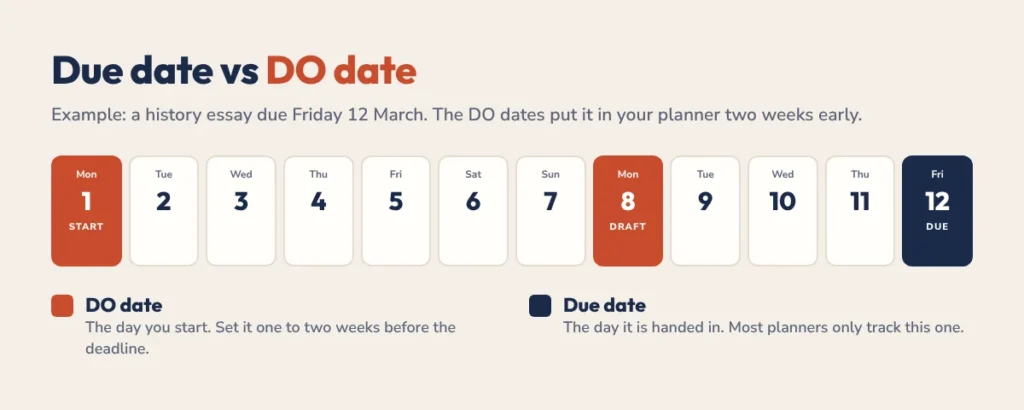
A due date tells you when something has to be handed in. A DO date tells you when you will start it. Most student planners only track the first one, which is why work piles up the night before.
Here is how it works in practice. Say your history essay is due on Friday 12 March. You set the DO date for Monday 1 March, with a second DO date for the first draft on Monday 8 March. Now the essay shows up in your planner two weeks early, not on the day it is due.
Write a DO date for every assignment the moment you get it. It takes ten seconds and it is the single habit that changes how a semester feels.
Set Up Your Semester in 30 Minutes
Do this once at the start of term and the planner does most of the remembering for you.
- Gather every syllabus. Open the course outline for each class.
- Fill in the semester overview. Add exam dates, essay deadlines, reading weeks and holidays.
- Add each deadline to the tracker. Write the due date, then pick a DO date one to two weeks earlier.
- Fill in your timetable. Add every class so you can see your free blocks for studying.
- Break down the biggest project. Use one Break It Down page for the assignment that worries you most.

Then spend five minutes each Sunday looking at the coming week. Check which DO dates land this week and block time for them.
Study Planning Tips That Work With the Planner
- Plan study blocks, not just tasks. Put “Biology revision, 2 to 3 pm” in the planner, not just “revise biology”. Our time blocking for students guide shows how to plan a full week, and our time blocking for ADHD guide shows a looser method that survives a busy week.
- Keep the Top 3 small. Three study tasks a day is plenty. Finishing three feels better than abandoning ten.
- Start revision from the exam countdown. When it hits 21 days, add revision sessions to your weekly pages. Our study planner guide shows how to map topics to weeks.
- Review every Sunday. Five minutes to move unfinished tasks and check next week’s DO dates.
Studying with ADHD? Our ADHD digital planner for college students guide covers setups built around focus and time blindness.
4 Student Planning Mistakes to Avoid
- Planning the whole semester in detail on day one. Add the big dates, then plan one week at a time. Plans made in September rarely survive October.
- Writing tasks that are too big. “Write essay” never gets ticked off. “Find three sources” does.
- Ignoring the weekend review. Without it, the planner slowly drifts out of date and you stop trusting it.
- Quitting after a bad week. Skip the guilt, turn to this week’s page and start again. A planner only works if you come back to it.
Which Device Should Students Use?
The free student planner is a standard PDF, so it works on whatever you already own:
- iPad: the most popular choice with an Apple Pencil, but a finger works for all the links. See our free digital planner for iPad guide.
- Android tablet: open it in Samsung Notes, Xodo or GoodNotes for Android. See our Android digital planner guide.
- Laptop: type into it with Adobe Acrobat Reader or Xodo if you don’t have a tablet.
Using GoodNotes? Our free GoodNotes planner guide shows how to import it in five minutes.
Free vs Paid Student Planners: Is the Free One Enough?
For many students, yes. The free edition covers the essentials: deadlines, timetable, DO dates and an exam countdown. It is a complete planner, not a demo with locked pages.
The free planner is probably enough if:
- You mainly need to track deadlines and classes
- You have a light or predictable course load
- You want to test digital planning before spending money
The full Academic Planner is worth it if:
- You want a planner that follows the academic year, from August 2026 to August 2027
- You take many classes or work alongside your studies
- You want much more room: 578 pages instead of the Lite selection
| Planner | Covers | Pages | Price |
|---|---|---|---|
| Free Academic Lite | 2027 | Lite edition | $0 |
| Academic Planner | Aug 2026 to Aug 2027 | 578 | $19 |
Comparing more options? Our guide to the best digital planner for university students looks at the choices for iPad, and our best digital planners 2026-2027 roundup compares brands. You can also see the full HyperPlanners range.
Free Student Planner FAQ
Is the free student planner really free?
Yes. There is no coupon code and no subscription. Choose the Academic edition at checkout, where the free price is already applied, and the PDF is yours to keep.
What is a DO date in a student planner?
A DO date is the day you plan to start an assignment, separate from the day it is due. Setting DO dates one to two weeks before each deadline stops work from piling up at the last minute.
Is the free student planner dated?
Yes. The free Academic Lite edition is dated for 2027. If you want a planner that runs with the academic year, the full Academic Planner covers August 2026 to August 2027.
Does the student planner work without an iPad?
Yes. It is a standard hyperlinked PDF, so it works on Android tablets in apps like Samsung Notes and Xodo, and on laptops in Adobe Acrobat Reader.
Is it good for high school and college students?
Yes. The deadline tracker, timetable and exam countdown work for any school or university schedule.
Get Your Free Student Planner
Download Academic Lite, spend 30 minutes setting up your semester, and you will see every deadline coming weeks ahead.
Want every free option in one place? Visit the free digital planner page.