
ADHD Digital Planner for College Students: A Semester Setup That Works
It’s week three. You’re looking at five syllabi, you’re not sure what’s due when, and one assignment has already slipped past. If that sounds familiar, you’re not lazy and you’re not behind for good. You just need a system built for how your brain handles time and deadlines.
This guide shows you how to set up a digital planner for college with ADHD: what to include, a three-step semester setup, a five-minute daily routine and what to do when the system breaks. For general study planning, see our study planner guide.
Quick answer: The best ADHD digital planner setup for college starts with one semester overview of every due date and exam, then a weekly page with your classes and three priorities a day. Give every deadline a DO date a few days earlier, keep a brain dump page for stray thoughts, use your phone calendar for class reminders and spend five minutes a day on the planner. A hyperlinked planner makes each check one tap.
Why College Planning Is Harder With ADHD
- Deadlines feel far away until they’re not. Something due in five weeks doesn’t feel urgent, so it slips. That’s often described as time blindness.
- Out of sight is out of mind. If a deadline isn’t in front of you, it can disappear completely.
- Every class has its own system. Different portals, syllabi and email lists make it hard to see the whole picture.
- Starting is the hardest part. Big assignments with no clear first step are easy to put off. Our executive dysfunction guide explains why.
Paper planners hide information behind pages you have to flip to. Task apps can be powerful but noisy. A hyperlinked digital planner sits in between: everything is visible, and every page is one tap away.
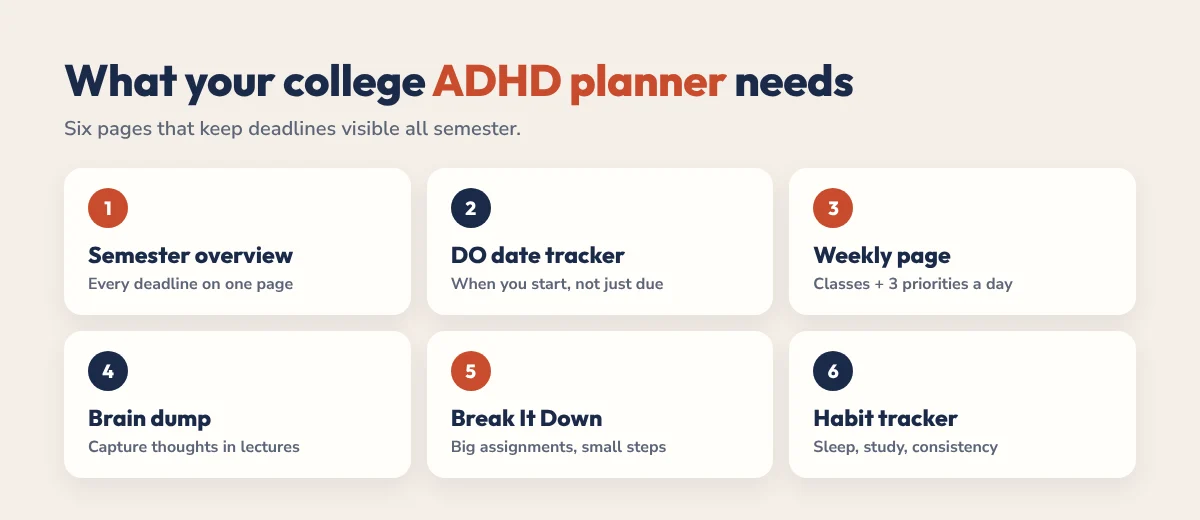
What Your College ADHD Planner Needs
- A semester overview. Every due date and exam for the whole term on one page.
- A deadline tracker with DO dates. The date you’ll actually start, not just the date it’s due.
- A weekly page. Classes, deadlines and three priorities per day.
- A brain dump page. Capture thoughts in lectures without losing focus.
- Break It Down pages. Turn a big assignment into small steps you can start today.
- A simple habit tracker. Sleep, study sessions and anything else you want to keep consistent.
Set It Up in 3 Steps
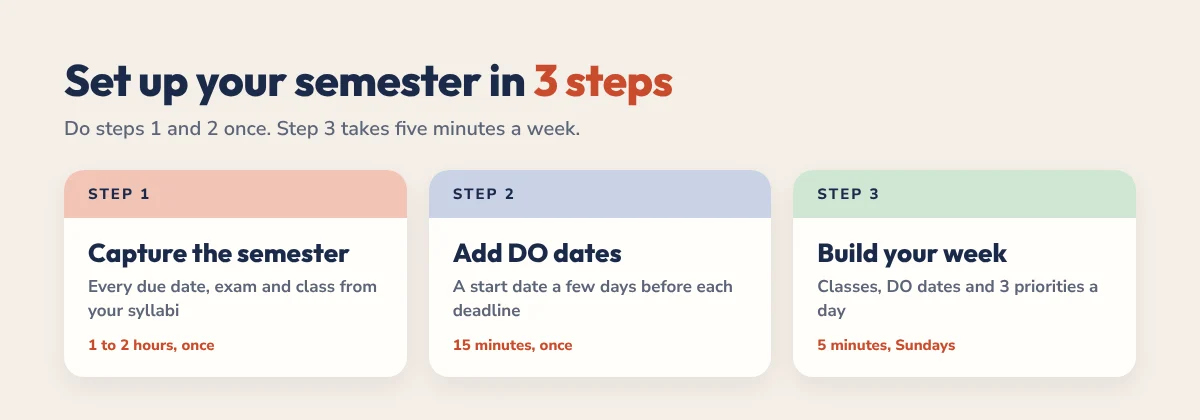
Step 1: Capture the semester (1 to 2 hours, once)
Go through every syllabus and write down all assignment due dates, exams, class times and office hours. Put them on a semester overview so you can see the whole term at once. This is the most valuable hour of planning you’ll do all semester.
Step 2: Add DO dates
For every deadline, pick a start date a few days or a week earlier and write it next to the due date. Then put the DO date on your weekly page. That way assignments show up while there’s still time to do them.
Step 3: Build your weekly page (5 minutes every Sunday)
Copy your classes into the week, add this week’s DO dates and deadlines, and choose three priorities for each day. Leave space for study blocks between classes. Our time management for students guide has study block ideas.
A 5-Minute Daily Routine
- Open today’s page with one tap (30 seconds).
- Check classes and your Top 3 for the day.
- Brain dump anything that’s on your mind (1 to 2 minutes).
- Glance at the semester overview for anything due this week.
- At night, tick off what’s done and move anything unfinished to tomorrow.
If it’s taking longer than five minutes, your setup is too complicated. Cut a section. Want a ready-made day? Try our free daily schedule builder and choose Student.
Planner Plus Calendar: Use Both
| Tool | What it handles |
|---|---|
| Phone calendar | Class times, exams and reminders before each one |
| Digital planner | Deadlines, DO dates, daily priorities and study plans |
| Brain dump page | Anything that pops up in lectures, sorted later |
Your calendar handles when. Your planner handles what. Together they cover both. Our ADHD calendar guide shows how to set up reminders that actually work.
Want your calendar to find study time for you? Our guide to Reclaim.ai for students with ADHD shows how to turn deadlines into study blocks that move when your week changes.
When the System Breaks (It Will)
Midterms hit, you get sick or life happens, and the planner sits untouched for a week. That’s normal. Here’s how to get back on track without starting over:
- Open the semester overview and see what’s due in the next two weeks.
- Email professors early about anything you’ve missed. Most are more flexible when you ask before the deadline.
- Plan just tomorrow, not the whole week.
- Restart properly next Sunday with a fresh weekly page.
Common Mistakes
- Skipping the semester overview. Without it, deadlines hide until it’s too late.
- Only writing due dates. Add DO dates or you’ll always be starting the night before.
- Too many daily tasks. Three priorities is enough on a class day.
- Decorating instead of planning. Fun, but it won’t get assignments done.
- Switching planners mid-semester. Simplify the one you have instead.
If you have access to disability or student support services, ask what’s available. Extensions, note-taking support and study skills sessions can make a real difference alongside your planner.
The HyperPlanners Academic Planner
Our 2026-2027 Academic Planner is built for exactly this setup. It has 578 hyperlinked pages covering August to August, with a semester planner, timetable, exam planner, a deadline tracker with DO dates and Break It Down pages for big assignments. It works in GoodNotes, Notability and any PDF app, and starts at $19 with no subscription. Prefer an ADHD-first layout? The ADHD Planner has a daily Top 3, brain dump and energy check.
Want to try first? Download the free student planner, or take our 60-second planner quiz to see which planner fits.
ADHD College Planner FAQ
What is the best digital planner for college students with ADHD?
One with a semester overview, a deadline tracker with DO dates, a simple weekly page with three daily priorities and hyperlinked navigation, so everything is one tap away. The HyperPlanners Academic Planner is built around these features.
Is digital or paper better for ADHD at college?
For most students with ADHD, a hyperlinked digital planner is easier because it’s always with you, every page is one tap away and mistakes are easy to fix. Paper still works for some people who find screens distracting.
What is a DO date?
A DO date is the day you plan to start an assignment, set a few days or a week before the due date. It turns deadlines into start dates, which is especially helpful with ADHD.
How long should daily planning take?
About five minutes. Check today’s classes and Top 3, brain dump, glance at the week’s deadlines and you’re done.
Is there a free student planner for ADHD?
Yes. The free HyperPlanners student planner includes a deadline tracker with DO dates, and ADHD Lite is a free 31-page planner with a Top 3 and brain dump.
Start This Week
Grab your syllabi, fill in one semester overview and add DO dates to every deadline. That single hour will save you from most of this semester’s last-minute panic.