Best Digital Planners 2026-2027: Free & Paid, Compared
The best digital planners for 2026-2027 are the ones you still open in March. That comes down to four things: hyperlinks that get you to today in one tap, a file that fits your device, a layout you can restart after a bad week, and a price that matches how much you’ll use it. We compared nine planners, free and paid, on exactly those.
Quick answer: the best digital planners for 2026-2027
- Best overall for ADHD and busy brains: HyperPlanners 2027 ADHD Digital Planner. Top 3 instead of a long list, a brain dump on every page, and a restart button when you fall behind. Five formats, from $19. (Ours.)
- Best for students: HyperPlanners 2026-2027 Academic Planner. August 2026 to August 2027, with DO dates next to due dates. From $19. (Ours.)
- Best premium paper-brand planner: Passion Planner Digital 2027. A well-known goal-setting system as a hyperlinked PDF, $40.
- Best value if you only use an iPad: the Goodnotes Marketplace planners, from $9.99, bought inside the app.
- Best app for Android: Penly, a planner app with a built-in hyperlinked planner that also opens other PDF planners.
- Best free option: HyperPlanners 2027 Lite, 31 hyperlinked pages, or the HappyDownloads free 2026 planner if you only need this year. (The Lite is ours.)
Three of these picks are our own planners. We say so wherever they appear, and the table below compares them against everyone else on the same criteria.
What to look for in a digital planner (and how we compared them)
Every planner here was checked against its maker’s own product page in September 2026. These are the five things that separate a planner you keep using from one you abandon:
- Hyperlinks. Can you tap from the year to a month to a day and back? A 365-day planner without links means scrolling through hundreds of pages to find today. It’s like a website with no menu.
- Devices and formats. Does it come in a shape that fits your screen: landscape tablet, portrait tablet, phone, or paper?
- Apps. Does it open in GoodNotes only, or in any PDF app, including Xodo and Samsung Notes on Android?
- Year coverage. Calendar year 2027, academic year 2026-2027, or undated.
- Price. One-time price, as listed on the maker’s site on the date we checked.
We didn’t score looks. Design is personal, and every planner here has screenshots on its own page.
About our own planners: HyperPlanners makes three of the nine planners on this list. We included them because we think they’re the best fit for ADHD, students and people who switch devices, and we’ve been specific about where others do better. If a planner suits you better than ours, buy that one.
Best digital planners 2026-2027: comparison table
| Planner | Price | Covers | Hyperlinked | Formats | Apps | Best for |
|---|---|---|---|---|---|---|
| HyperPlanners 2027 ADHD Digital Planner (ours) | From $19 | Jan to Dec 2027 | Yes | Landscape, portrait, phone, A4, US Letter | Any PDF app | ADHD, restarting after a bad week |
| HyperPlanners 2026-2027 Academic Planner (ours) | $19, or $29 with the Paper edition | Aug 2026 to Aug 2027 | Yes | Landscape, portrait, phone, A4, US Letter | Any PDF app | Students with deadlines |
| Passion Planner Digital 2027 | $40 (weekly and daily bundle) | 2027, or undated | Yes | Tablet | GoodNotes, Notability, Xodo | Goal-setting systems |
| Dash Planner 2026 Digital Planner Set | $24.99 ($12.50 on sale when checked) | 2026, with 2027 plan-ahead pages | Yes | Tablet, iPhone | GoodNotes, Notability, Noteshelf, Xodo and more | iPad users who want 2026 now |
| Goodnotes Marketplace planners | $9.99 to $14.99 | Mostly 2026 | Yes | Tablet | Goodnotes only | Cheapest paid option on iPad |
| Penly | App, see Google Play | Undated built-in planner | Yes | Android tablet | Penly (Android only) | Android users who want an all-in-one app |
| HyperPlanners 2027 Lite (ours) | Free | 2027, 31 pages | Yes | Landscape | Any PDF app | Trying digital planning first |
| HappyDownloads Free Digital Planner 2026 | Free | 2026 | Yes | Tablet | GoodNotes, Penly, Notability | A free planner for the rest of 2026 |
| Printable calendars, such as Calendarpedia | Free | Any year | No | Paper or static PDF | Any | Testing whether your app works |
The best digital planners for 2026-2027, one by one
1. HyperPlanners 2027 ADHD Digital Planner (ours)
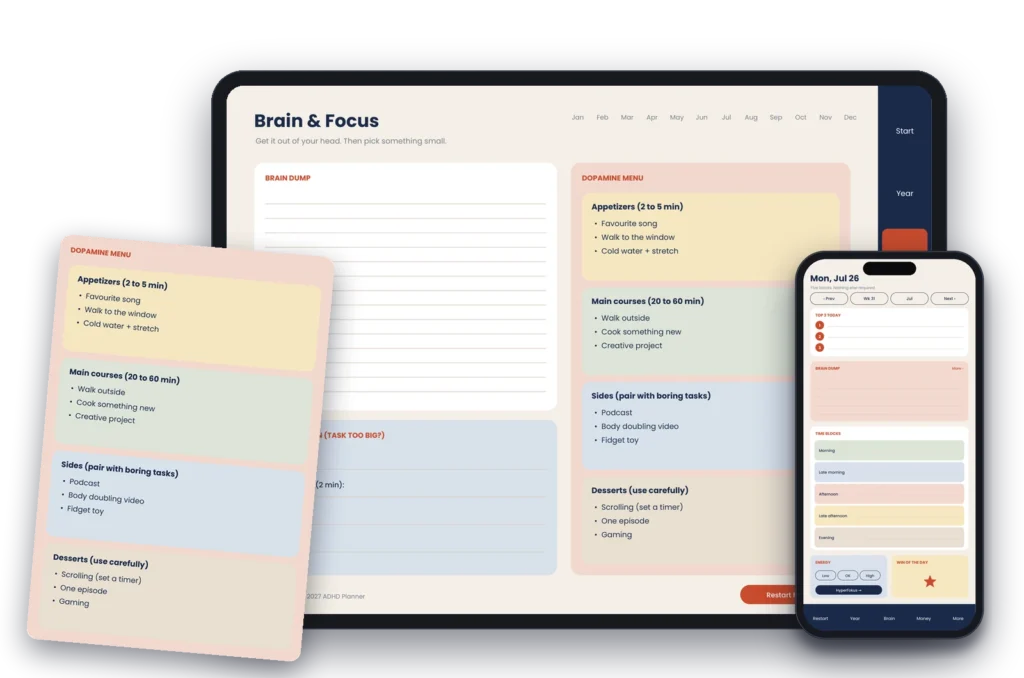
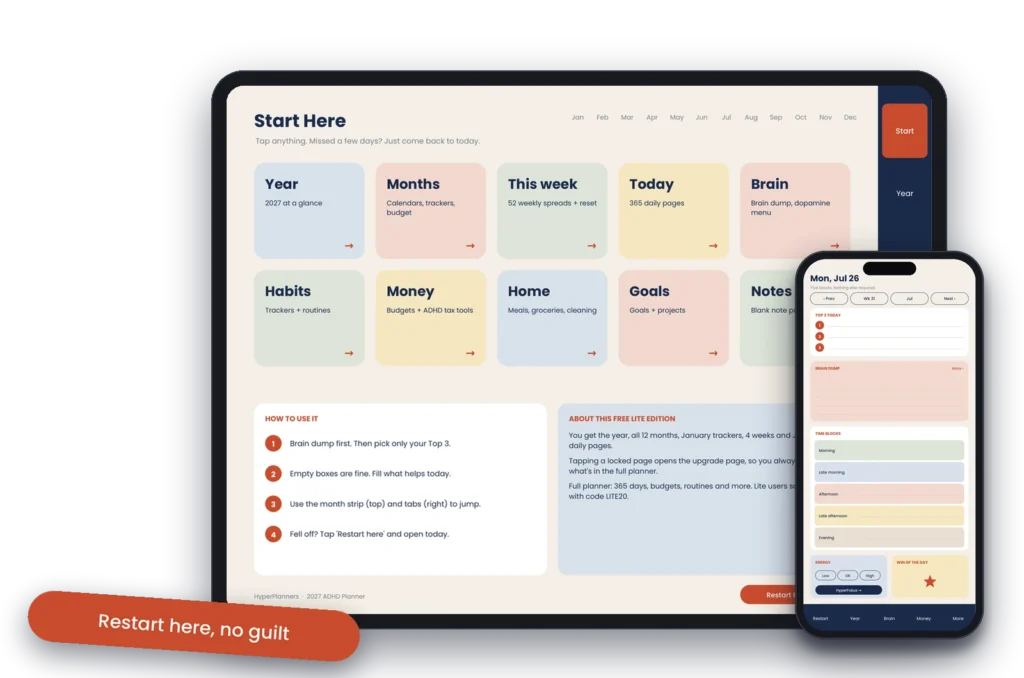
Built for brains that don’t run on a to-do list. Every day page asks for your Top 3, not twenty tasks. There’s a brain dump on every page, time blocks named by part of the day instead of by the hour, and a “Restart here, no guilt” button that takes you to today after you’ve missed a week.
- Price: from $19, one payment
- Covers: January to December 2027
- Formats: landscape and portrait tablet, phone, printable A4 and US Letter, in four colour themes
- Good at: getting back on track, one-tap navigation, working on any device
- Watch out for: it’s deliberately minimal, so if you want stickers and decorated spreads, look at the Goodnotes Marketplace planners instead
2. HyperPlanners 2026-2027 Academic Planner (ours)
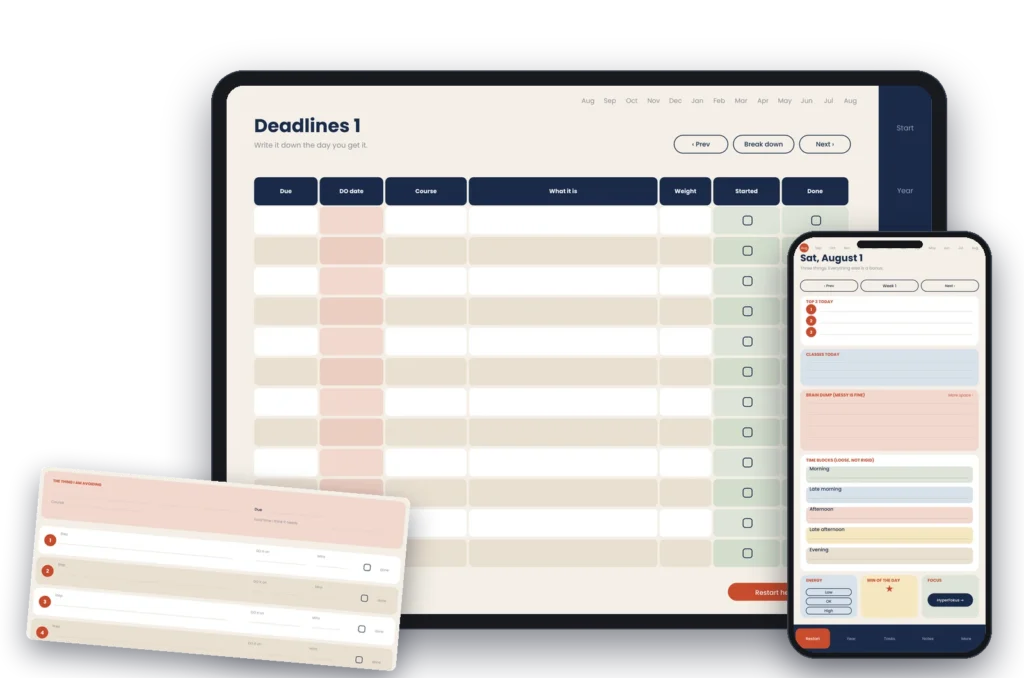
For students who keep missing deadlines they knew about. It runs August 2026 to August 2027, and next to each due date there’s a DO date: the day you actually start. Big assignments get a Break It Down page that splits them into six steps you can start in ten minutes.
- Price: $19, or $29 with the Paper edition (textured pages and leather covers)
- Covers: August 2026 to August 2027, 578 pages
- Formats: the same five as the ADHD planner, in four themes
- Good at: deadlines, exams and semester planning
- Watch out for: if your year starts in January, the ADHD or a calendar-year planner fits better
3. Passion Planner Digital 2027
Passion Planner is a well-known paper planner brand, and its digital version keeps its goal-setting system. There’s a dated 2027 edition and an undated one, both as a weekly and daily bundle, plus a free undated sample.
- Price: $40 for the weekly and daily bundle
- Apps: GoodNotes, Notability, Xodo
- Good at: long-term goals broken into monthly and weekly steps
- Watch out for: the highest price on this list, and its site doesn’t mention Android
4. Dash Planner 2026 Digital Planner Set
A hyperlinked planner that lists more compatible apps than most, including Noteshelf and Xodo for Android tablets. Dash also sells a 2026-2027 academic planner at $19.99.
- Price: $24.99 ($12.50 on sale when we checked)
- Covers: 2026, with plan-ahead pages for 2027
- Good at: broad app support across iPad, Mac, iPhone and Android tablets
- Watch out for: it’s a 2026 planner, so buying now covers only the last months of the year
5. Goodnotes Marketplace planners
Goodnotes sells planners from independent designers inside its own app, from $9.99. Its own round-up lists eleven, from minimal planners to character designs.
- Price: $9.99 to $14.99
- Good at: the lowest paid prices here, and one-tap install inside Goodnotes
- Watch out for: they live in Goodnotes, so they’re a poor fit if you might switch to another app or device later
6. Penly (for Android)
Penly is an Android app built for digital planning. It comes with an undated, hyperlinked planner, and it opens other PDF planners with their links working.
- Price: check Google Play, since its site doesn’t list one
- Good at: Android tablets, and making your own links inside a PDF
- Watch out for: Android only, so your planner won’t follow you to an iPad in the app
7. HyperPlanners 2027 Lite (ours, free)
The free edition of our ADHD planner: 31 hyperlinked pages covering all of 2027, with January planned in depth (four weeks and seven day pages), a habit and mood tracker, and a brain dump page.
- Price: free
- Good at: finding out whether digital planning sticks for you before you pay
- Watch out for: after January, the weeks and days are in the full planner, not the Lite
Download the free 2027 Lite here
8. HappyDownloads Free Digital Planner 2026
A free hyperlinked planner for 2026, with Monday and Sunday start versions. It works in GoodNotes, Notability and Penly.
- Price: free, no email needed when we checked
- Good at: a free planner for the rest of 2026
- Watch out for: it ends in December 2026
9. Free printable calendars
Sites like Calendarpedia offer free calendar PDFs. You can import them into any note app.
- Price: free
- Good at: testing whether your app and stylus work, before you commit
- Watch out for: no links, so you’ll scroll to find today; they’re built for paper, not screens
The best digital planner for your device
iPad
Almost every planner here works on iPad. If you plan in GoodNotes and never intend to leave it, the Goodnotes Marketplace planners are the cheapest paid choice. If you want a planner that also works on your phone or on paper, pick one sold as a PDF. Setup guide: How to import a planner into GoodNotes on iPad.
Android and Samsung tablets
Choose a hyperlinked PDF, not a GoodNotes-only planner. Open it in Xodo (free) or Noteshelf, or use Penly, which is built for Android planning. Full app comparison and setup: Best digital planner for Android.
Phone
Most planners are drawn for a tablet, so on a phone the text is tiny and the tabs are too small to tap. Look for a planner with a dedicated phone format. The HyperPlanners ADHD and Academic planners include one, with navigation moved to a bottom bar you can reach with your thumb.
Windows, Mac and laptops
Any hyperlinked PDF works in a desktop PDF reader such as PDF Expert, Adobe Acrobat or Xodo. Typing works fine here, so a planner with clear text boxes beats one built for handwriting.
Paper
If you’d rather print, pick a planner sold with printable A4 or US Letter files. A tablet file printed on paper usually wastes ink on coloured backgrounds and leaves links you can’t tap.
The best digital planner for your situation
- ADHD or executive function struggles: a planner that expects you to fall off and makes coming back easy. See our ADHD digital planner guide for iPad.
- University students: a planner that runs on the academic year and tracks deadlines by start date, not due date. See the best digital planner for university students.
- First time trying digital planning: start free. Any of the three free options above will tell you within two weeks whether it sticks.
Free or paid digital planner?
Start free if you’ve never used a digital planner. The honest risk isn’t wasting $20. It’s buying a planner, using it for nine days, and never opening it again. A free planner answers that question at no cost.
Pay when a free planner has lasted you two weeks and you’re running into its limits: no pages past January, no phone version, or no space for what you actually track. At that point, a one-time $19 to $40 buys a full year.
Either way, a well-designed free planner with hyperlinks beats a poorly built paid one. Expensive doesn’t mean better. Pick the features that match how you actually plan.
How to choose: four questions
- Where will you plan? On one iPad only, any GoodNotes planner works. On Android, a phone, or more than one device, choose a PDF with a format for each.
- When does your year start? January means a 2027 planner. August or September means an academic 2026-2027 planner.
- What made your last planner fail? If you fell behind and never came back, choose one built for restarting. If it felt empty, choose one with more structure.
- Will you print any of it? Then make sure printable A4 or US Letter files are included, not just the tablet file.
How to set up your digital planner in 5 steps
- Download and import. Save the PDF, then open it in your app (GoodNotes, Notability, Xodo or Samsung Notes). Keep a backup copy of the blank file before you write anything.
- Pick your cover. If your planner has several covers or themes, choose the one you actually want to open every day.
- Set up your first month. Jump to the current month, add the appointments you already know, and write one or two goals for it.
- Test the navigation. Tap between the year, a month, a week and today. If links don’t work, switch your app to read or tap mode.
- Build the habit. The best planner is the one you open. Start with our 8-minute daily planning routine.
Need detailed, app-by-app instructions? Read how to use a digital planner on iPad and Android.
Digital planner FAQ
What is the best digital planner for 2026-2027?
It depends on your device and your year. For ADHD and anyone who needs to restart easily, we recommend the HyperPlanners 2027 ADHD Digital Planner (ours). For students, an academic 2026-2027 planner. For goal-setting, Passion Planner Digital. On iPad only, the Goodnotes Marketplace planners are the cheapest paid option.
What is the best free digital planner?
The HyperPlanners 2027 Lite covers all of 2027 in 31 hyperlinked pages. The HappyDownloads free planner covers the rest of 2026. Both work in any PDF app.
When should I start using my 2027 planner?
A few weeks before January. Use that time to learn the layout, fill in your first month and set your goals, so you start the year planning instead of learning. Students should start their academic planner in August.
Do digital planners work on Android?
Yes, if the planner is a hyperlinked PDF. Open it in Xodo, Noteshelf or Penly. Planners bought inside Goodnotes stay in Goodnotes.
Can I use the same planner on more than one device?
Yes, with cloud sync. GoodNotes syncs smoothly between Apple devices through iCloud. Moving between an iPad and an Android tablet means sharing the PDF through Google Drive or Dropbox, so pick one main device to write on.
Can I use a digital planner on my phone?
Yes, but a tablet-sized file is hard to use on a phone screen. Choose a planner with a dedicated phone format.
Can I print a digital planner?
Yes. Choose one that includes printable A4 or US Letter files, designed for paper and ink rather than for a screen.
What does hyperlinked mean?
The tabs, months and dates are links. Tap one and you jump straight to that page, instead of scrolling through hundreds of pages. See what a hyperlinked planner is.
Dated or undated?
Dated if you’ll use it every week: the dates are already there, so setting up takes nothing. Undated if you plan in bursts, or you’re starting partway through a year.
Do I need an Apple Pencil or stylus?
No. You can type in most planner apps. But handwriting is faster for quick notes, and any basic stylus that works with your tablet is enough.
How do I back up my digital planner?
Turn on cloud sync in your app, and export your planner as a PDF once a month. That way a lost or broken device never costs you more than a few weeks of notes.
What if my planner stops working for me mid-year?
Switch. That’s one of the best things about digital planning. You can start a new planner, delete pages you don’t use, or keep two planners for different parts of your life, with no paper wasted.
Start with the one you’ll still open in March
The best digital planner isn’t the one with the most pages. It’s the one you come back to after a missed week. If you’re not sure yet, start with a free one for two weeks, then upgrade to the version that fits your device and your year.