
Best Digital Planner Apps for 2027 (Free and Paid, iPad and Android)
A digital planner is only as good as the app you open it in. The right app makes tapping between pages instant and writing feel natural. The wrong one makes links stop working, handwriting lag and syncing a headache.
This guide compares the best apps for hyperlinked digital planners on iPad, Android, Windows and phones, with the pros, cons and pricing model of each, plus a quick way to choose. New to digital planning? Start with our beginner’s guide to using a digital planner.
Quick answer: On iPad, GoodNotes is the best all-round app for digital planners and Notability is the best if you also take a lot of class or meeting notes. On Android, Xodo is the best free option and Samsung Notes is great on Galaxy tablets. Noteshelf is a good pick if you switch between iPad and Android. All of them support hyperlinked PDF planners and have a free version to try first.
What Makes a Good Digital Planner App?
- Working hyperlinks. Tapping a tab should jump straight to that page.
- Smooth handwriting. Low lag and good palm rejection with a stylus or finger.
- Easy PDF import. Open a planner from Files, email or cloud storage in a few taps.
- Useful tools. Highlighter, lasso, shapes, text boxes and the option to add pages.
- Backup and sync. So you don’t lose a year of planning if your tablet breaks.
Quick Comparison
| App | Devices | Best for | Pricing model |
|---|---|---|---|
| GoodNotes | iPad, iPhone, Mac, plus Android, Windows and web | Most digital planner users | Free plan, paid yearly plans or one-time option |
| Notability | iPad, iPhone, Mac | Planning plus lots of notes and audio | Free plan, subscriptions or one-time option |
| Noteshelf | iPad, Android | Switching between Apple and Android | Free version, paid upgrade |
| Xodo | Android, iOS, Windows, web | Free planning on Android and Windows | Free core tools, paid Pro |
| Samsung Notes | Samsung Galaxy tablets and phones | Galaxy Tab owners | Free |
| Flexcil | iPad, Android | Students who study from PDFs | Free version, paid upgrade |
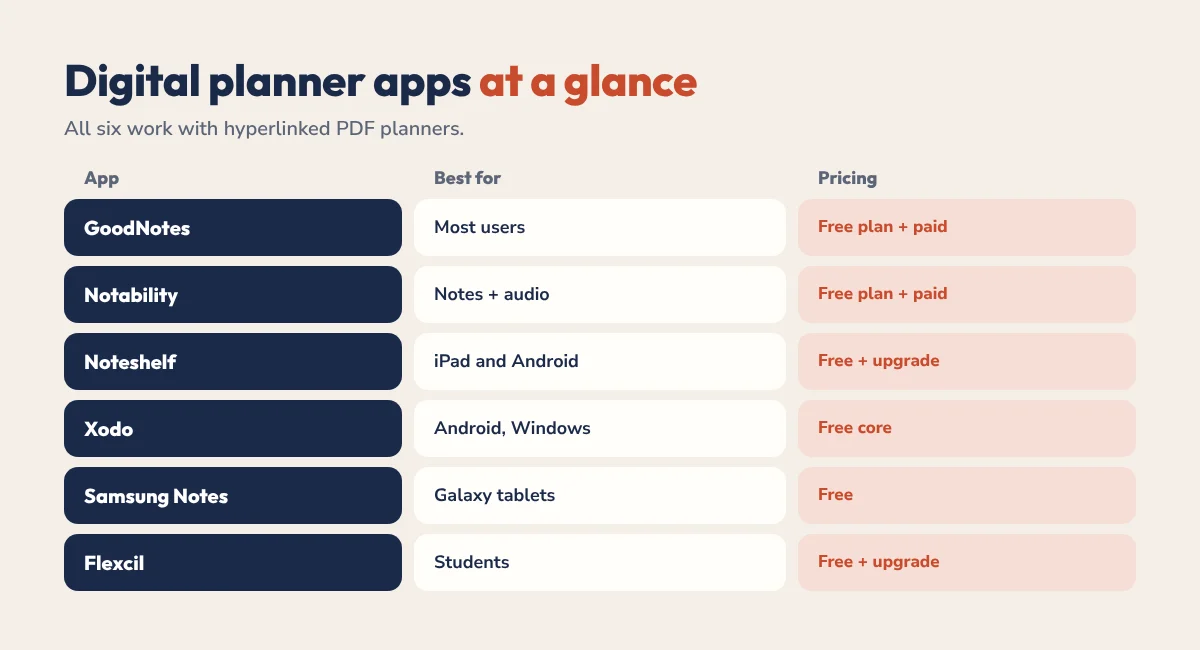
Prices and plans change often, so check the App Store or Google Play for current pricing before you pay.
Best Apps for iPad
1. GoodNotes
The most popular app for digital planners, and for good reason. Hyperlinks work reliably, handwriting is smooth with an Apple Pencil, and organising notebooks into folders is simple. The free plan is limited to a few notebooks, so most planner users end up on a paid plan.
- Pros: reliable hyperlinks, great handwriting, huge choice of planner templates, read-only mode for easy navigation.
- Cons: free plan is limited, some features need a paid plan.
- Best for: most people using a hyperlinked planner on iPad.
Setting up? Follow our GoodNotes import guide.
2. Notability
Notability shines if your planner lives alongside lots of other notes. It can record audio while you write, which students and professionals love, and it handles hyperlinked PDFs well. It has a free plan and subscriptions, and in July 2026 it brought back a one-time purchase option.
- Pros: audio recording synced to notes, clean interface, good PDF support.
- Cons: Apple devices only, and the most useful features need a paid plan.
- Best for: students and professionals who take notes as well as plan.
See our Notability planner guide for setup tips.
3. Noteshelf
A strong alternative with good handwriting and hyperlink support, and versions for both iPad and Android. If you might switch tablets in future, it’s a safe choice.
- Pros: works on Apple and Android, good pen tools, supports audio notes.
- Cons: smaller community and fewer guides than GoodNotes.
- Best for: people who use both an iPad and an Android device.
Best Apps for Android and Windows
4. Xodo
The best free app for digital planners on Android, and it also runs on Windows, iOS and the web. Hyperlinks work with the hand tool, and the pen and highlighter are good enough for daily planning.
- Pros: free core features, fast with large PDFs, works on almost every device.
- Cons: handwriting feels less natural than GoodNotes, some advanced tools are paid.
- Best for: Android and Windows tablets, and anyone on a budget.
5. Samsung Notes
Already on every Samsung Galaxy tablet and works beautifully with the S Pen. You can import a PDF planner and tap the links in view mode.
- Pros: free, excellent S Pen experience, syncs with your Samsung account.
- Cons: only on Samsung devices.
- Best for: Galaxy Tab owners.
6. Flexcil
A study-focused app on iPad and Android that’s great for reading and annotating PDFs side by side. It handles planners well too.
- Pros: split-screen PDF and notes, handy for students.
- Cons: the interface takes a little getting used to.
- Best for: students who plan and study in one app.
Our Android digital planner guide covers Android setup in more detail.
How to Choose the Right App
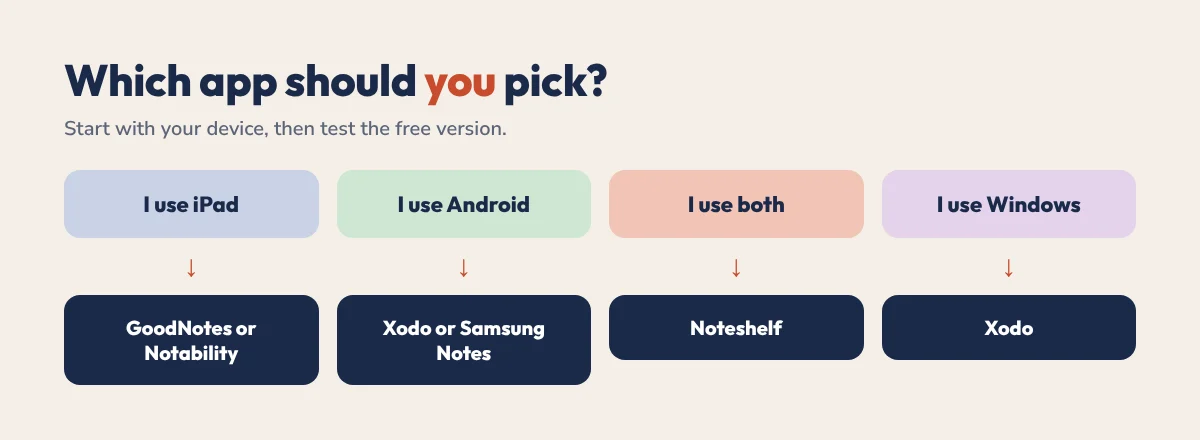
- Start with your device. iPad: GoodNotes or Notability. Android: Xodo or Samsung Notes. Both: Noteshelf.
- Think about notes. If you take lots of class or meeting notes, lean towards Notability or Flexcil.
- Test the free version with a free hyperlinked planner before paying.
- Check links and handwriting. Tap a few tabs and write a full page.
- Commit for a month. Switching apps often means moving all your notes.
Do Planner Apps Replace a Digital Planner?
Not really. Apps like GoodNotes and Notability are the notebook. A hyperlinked digital planner is what goes inside it: the dated pages, tabs and layouts that turn a blank notebook into a planning system. If you plan around a calendar too, our time blocking apps comparison covers calendar-style tools.
Free Planners That Work in Every App
All HyperPlanners planners are hyperlinked PDFs that work in GoodNotes, Notability, Noteshelf, Xodo, Samsung Notes and Flexcil. Test your app with one of our free 2027 planners: the free All-in-One planner, ADHD Lite or the free academic planner for students.
Found your app? The 2027 All-in-One Planner has 556 hyperlinked pages for work, home, money and habits, and the ADHD Planner starts at $19. Not sure which? Take the 60-second planner quiz.
Digital Planner Apps FAQ
What is the best app for digital planners?
GoodNotes is the best all-round choice on iPad. Notability is best if you also take lots of notes, Xodo is the best free option on Android and Windows, and Samsung Notes is great on Galaxy tablets.
Is there a free app for digital planners?
Yes. Xodo is free on Android, Windows and iOS, Samsung Notes is free on Galaxy devices, and GoodNotes, Notability, Noteshelf and Flexcil all have free versions with some limits.
Do hyperlinked planners work in Notability?
Yes. Import the PDF into Notability and tap the links to move between pages.
What is the best digital planner app for Android?
Xodo is the best free option, Samsung Notes is ideal on Galaxy tablets and Noteshelf is a good paid option if you also use an iPad.
Can I use the same planner on iPad and Android?
Yes. The PDF works on both. To keep your handwriting in sync, use an app that runs on both devices, like Noteshelf, Xodo or GoodNotes with a plan that includes cross-platform sync.
Pick One and Start Planning
Choose the app that fits your device, import a free planner and use it for a week. The best app is the one you’ll actually open every day.