
Notability Planner: How to Set Up a Digital Planner in Notability
GoodNotes gets most of the attention, but plenty of people already live in Notability for notes, lectures and audio recordings. The good news: you don’t need to switch apps to use a digital planner. Any PDF planner works in Notability, hyperlinks included.
This guide shows you how to import a planner into Notability, make the links work, set it up so you actually use it, and how Notability compares with GoodNotes for planning. If you use GoodNotes instead, follow our GoodNotes import guide.
Quick answer: To use a digital planner in Notability, download the planner PDF, open it in the Files app, tap Share and choose Notability, then import it as a new note. Tap the tabs and dates to jump between pages, and write on each page with your Apple Pencil or finger. Keep a blank copy of the planner, and use Notability’s dividers to keep it separate from your class notes.
What You Need
- An iPad with Notability installed. Notability also runs on Mac and iPhone, but iPad is best for handwriting.
- A planner PDF. Any hyperlinked PDF planner works. Our free 2027 planners work in Notability as well as GoodNotes.
- A stylus (optional). An Apple Pencil or a cheaper stylus makes writing easier. You can also type and tap with a finger.
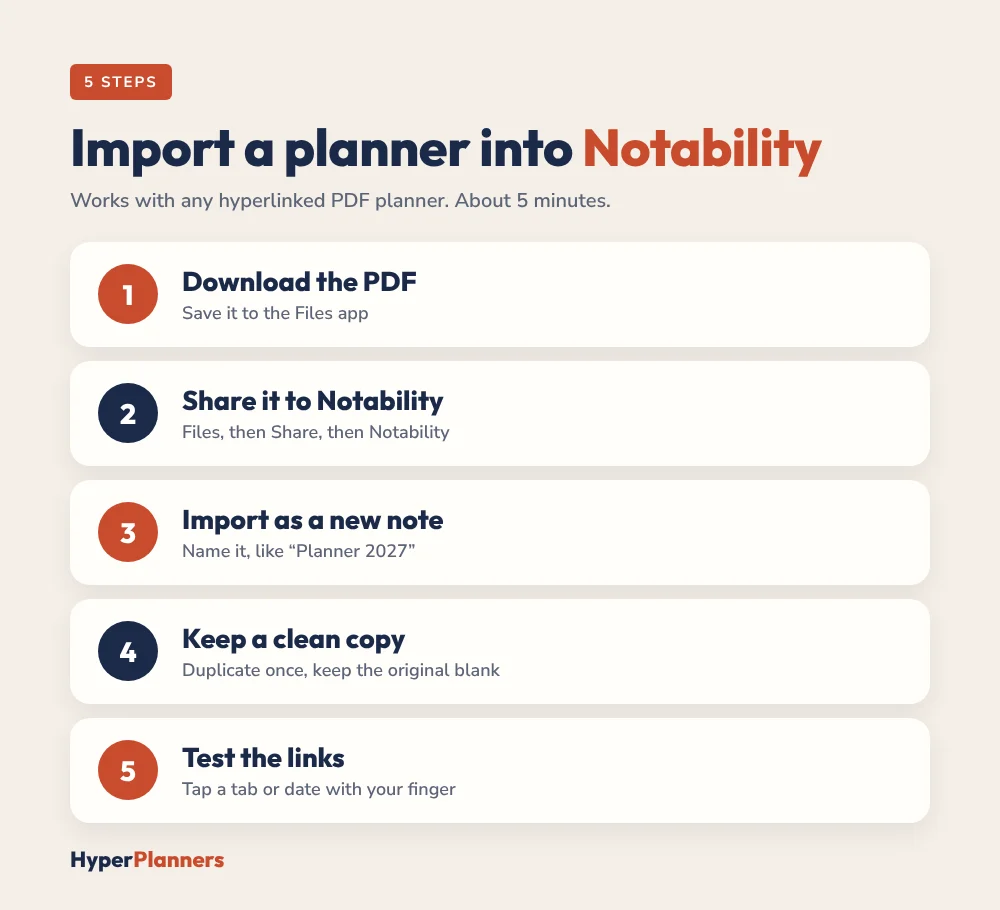
How to Import a Planner into Notability in 5 Steps
- Download the PDF. Open your download link on your iPad and save the planner to the Files app.
- Share it to Notability. In Files, open the PDF, tap the Share icon and choose Notability.
- Import as a new note. Notability opens the planner as a note. Give it a clear name, like “Planner 2027”.
- Keep a clean copy. Duplicate the note once and keep the original untouched, so you can start fresh if you need to.
- Test the links. Tap a tab or a date. If it jumps to the right page, you’re ready to plan.
How to Make Hyperlinks Work in Notability
Hyperlinked planners rely on tappable tabs and dates. If tapping does nothing, try these fixes:
- Switch off the writing tool. Links usually respond when no pen or highlighter is active. Tap your link with a finger.
- Check the file. Some planners only have links in the PDF version, not in image or Notability template versions.
- Re-import the original PDF. If the file was flattened or exported from another app, the links may have been removed.
- Update Notability. Older versions can behave differently with PDF links.
If links still don’t work, open the same PDF in another app like Files or GoodNotes. If the links work there, the issue is the import, so try re-importing from the original download.
Set Up Your Notability Planner So You Actually Use It
- Use a divider for planning. Keep your planner in its own divider or subject, away from class and meeting notes.
- Pin it to the top. Put the planner first in your library so it’s one tap away.
- Pick three pen colours. One for tasks, one for appointments and one for notes. More than that gets messy.
- Plan in the same spot each day. A quick morning check-in with your coffee builds the habit faster than any app.
- Use the daily page for a Top 3. Three priorities a day is plenty.
A Simple Weekly Routine in Notability
- Sunday (10 minutes): open the weekly page, add appointments and deadlines, and pick the week’s three big goals.
- Each morning (5 minutes): jump to today’s page from the calendar and write your Top 3.
- During the day: add quick notes or record a meeting in the same note, so everything for that day lives in one place.
- Each evening (2 minutes): tick off what got done and move the rest to tomorrow.
4 Mistakes to Avoid
- Mixing the planner with class notes. Keep it in its own divider so it never gets buried.
- Writing on your only copy. Always keep a clean duplicate of the planner.
- Using too many colours and stickers. Decorating is fun, but it can turn a 5-minute plan into 40 minutes.
- Importing a flattened file. Use the original PDF from your download, or the links may not work.
Notability Features That Help With Planning
| Feature | How it helps your planner |
|---|---|
| Audio recording | Record a meeting or lecture and link it to that day’s notes |
| Split view | Open your planner and class notes side by side |
| Handwriting search | Find a task or name you wrote weeks ago |
| Stickers and images | Add photos, screenshots or stickers to pages |
| iCloud sync | Keep your planner on iPad, iPhone and Mac |
Feature names and availability can change between Notability plans and versions, so check the app if something looks different on your device.
Notability vs GoodNotes for Digital Planning
| Notability | GoodNotes | |
|---|---|---|
| Best for | Notes plus audio, lectures, meetings | Planners, journals, templates |
| Hyperlinked PDFs | Supported | Supported |
| Organising | Subjects and dividers | Folders and notebooks |
| Page templates | Fewer built-in options | Large template library |
| Audio recording | Built in | Available in newer versions |
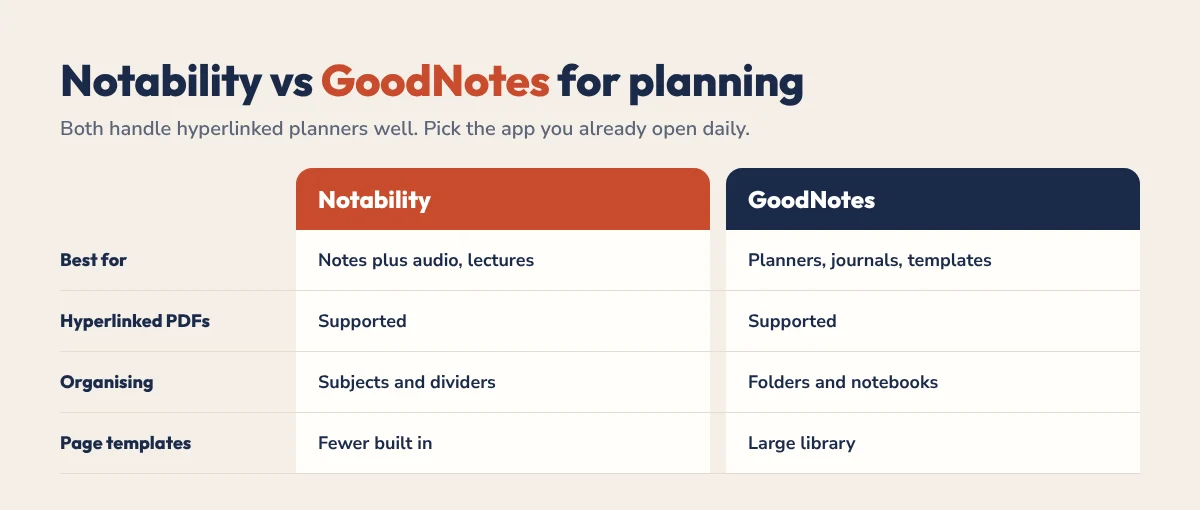
Both work well for a hyperlinked planner. Choose the app you already open every day. If you have ADHD, our GoodNotes vs Notability for ADHD comparison goes deeper.
Tips for Time Blocking in Notability
A planner is most useful when your day has a shape. Use the daily page to give your Top 3 tasks a block of time, and use a highlighter colour for each type of work. Our time blocking on iPad guide shows the method step by step, and it works the same way in Notability.
Free Planners That Work in Notability
Our free 2027 planners are hyperlinked PDFs, so they work in Notability, GoodNotes and any PDF app. Pick All-in-One, ADHD or Academic:
Notability Planner FAQ
Can you use a digital planner in Notability?
Yes. Any PDF planner can be imported into Notability. Hyperlinked planners keep their tappable tabs and dates, so you can jump between pages just like in GoodNotes.
How do I import a PDF planner into Notability?
Save the PDF to the Files app, open it, tap Share and choose Notability. It opens as a new note you can write on.
Why are my planner hyperlinks not working in Notability?
Make sure no writing tool is active and tap the link with your finger. If links still don’t work, re-import the original PDF, since exported or flattened files can lose their links.
Is Notability or GoodNotes better for a digital planner?
Both work well. GoodNotes is more popular for planners and templates, while Notability is great if you also record lectures or meetings. Use the app you already open every day.
Are there free planners for Notability?
Yes. Any free PDF planner works in Notability, including the free HyperPlanners 2027 planners.
Start Planning in Notability Today
Download a planner, share it to Notability, test the links and fill in tomorrow’s Top 3. That’s all the setup you need.