
Free GoodNotes Planner 2027: Hyperlinked PDF Download
Looking for a free GoodNotes planner that actually works the way a paid one does, with real tappable tabs and dated pages? This guide walks you through the one we give away: the free 2027 HyperPlanners digital planner. It is a hyperlinked PDF built for GoodNotes, and you can download it today without paying anything.
It is part of our free digital planner collection, where you can also compare all three free editions side by side.
Quick answer: The free HyperPlanners GoodNotes planner is a hyperlinked PDF dated for 2027. You pick one of three Lite editions (All-in-One, ADHD or Academic), download it from Gumroad at no cost, and import it into GoodNotes 5 or 6. Every tab and date is a working link, and no subscription is needed.
What You Get in the Free GoodNotes Planner
A lot of free GoodNotes planners are flat PDFs with no links, so you end up scrolling through thumbnails to find next Tuesday. Ours uses the same hyperlink system as the full planners, just with fewer pages.
Each free edition gives you:
- A year at a glance page where every date is tappable
- All 12 monthly calendars for 2027, each with a focus box and a don’t-forget list
- Weekly spreads and daily pages linked to their month
- Tabs on every page so you can jump anywhere in one tap
- Instant download and lifetime access, with no subscription
The ADHD Lite edition has 31 fully hyperlinked pages, and all links are active the moment you download.
Pick Your Free Edition
You choose one style when you download. They are built for different kinds of days.
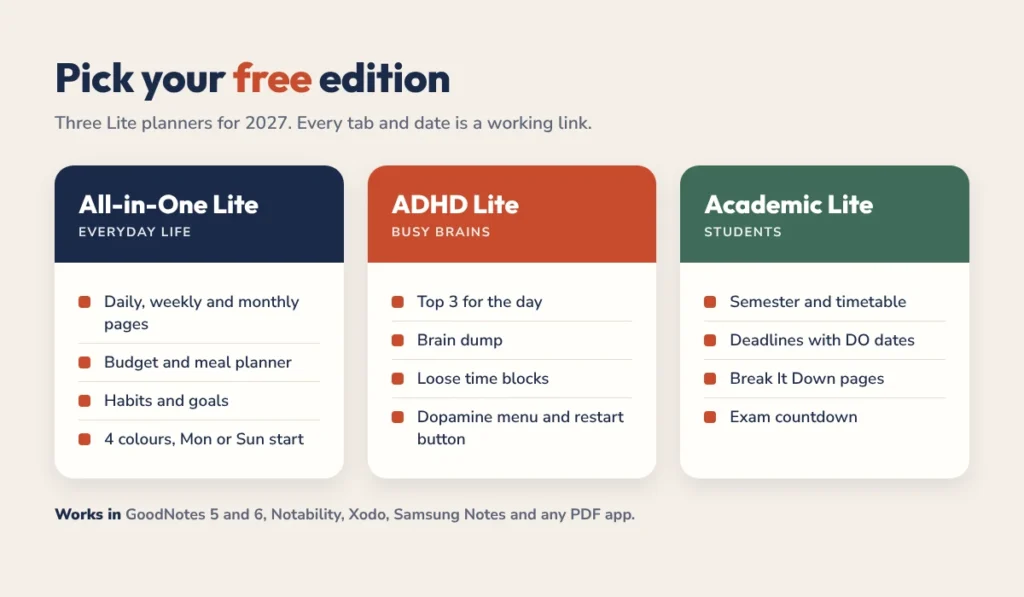
All-in-One Lite
For everyday life. Daily, weekly and monthly pages, plus a budget page, meal planner, habit tracker and goals. It comes in 4 colours with a Monday or Sunday start.
ADHD Lite
For busy brains. It has a Top 3 for the day, a brain dump, loose time blocks, a dopamine menu and a no-guilt restart button for the days that go sideways. If you want the full setup, read our GoodNotes planner for ADHD guide, or see how each page works in our free ADHD planner guide.
Academic Lite
For students. Semester overview, class timetable, deadlines with separate DO dates, Break It Down pages for big assignments and an exam countdown.
How to Download and Import It into GoodNotes
Setup takes about five minutes. Here is the short version.
- Open the free planner page on Gumroad and choose your edition.
- Complete the free checkout. You will get a download link on screen and by email.
- On your iPad, tap the PDF file, then tap the Share icon and choose GoodNotes.
- Select Import as New Document so the planner stays as one file.
- Open it and tap a month tab to check that the links work.
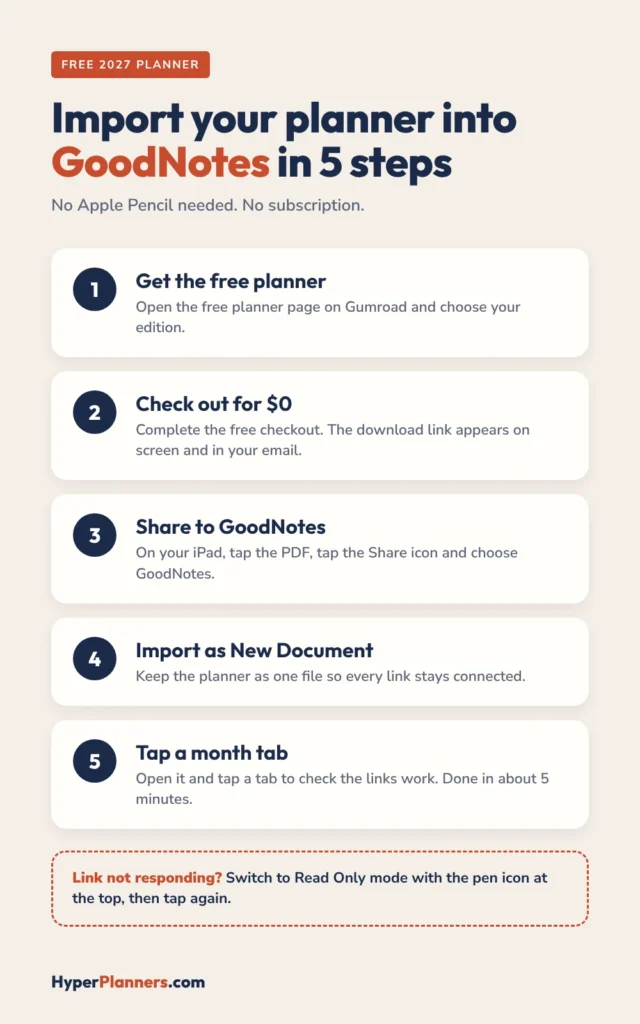
Want screenshots for every step? Our guide to importing a digital planner into GoodNotes on iPad covers it in detail, including what to do if the file opens in Files instead. Using a different app on your iPad? See our free digital planner for iPad guide.
How to Use the Links in GoodNotes
The links are what make a GoodNotes planner feel fast. A few habits make them work every time:
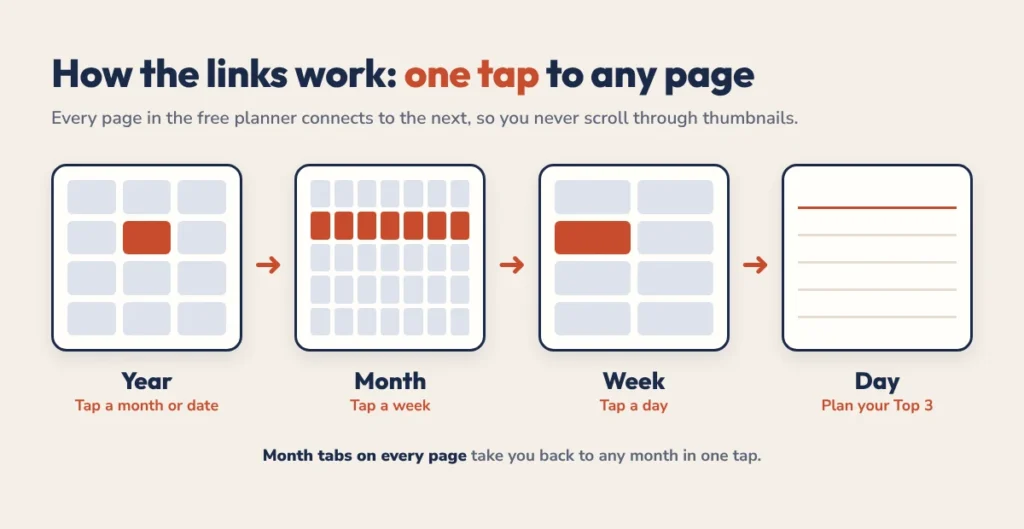
- Tap, don’t write, on tabs. Use your finger or a quick pencil tap on a tab to jump to that page.
- Use Read Only mode if a link won’t respond. Tap the pen icon at the top to switch modes, then tap the link again.
- Start each day from the year page. Tap today’s date and you land on the right daily page.
- Bookmark one page you use most. GoodNotes bookmarks plus the planner tabs mean you never scroll.
New to hyperlinked planning? What is a hyperlinked planner explains how the tabs and page links fit together.
Your First Week with the Planner: A Simple Setup
A new planner is exciting for about two days. Then it sits unopened. The fix is to start small and build one habit at a time. Here is a setup that takes about ten minutes a day.
Day 1: Fill in the month, not the whole year
Open the monthly calendar for the current month and add only the fixed things: appointments, deadlines, birthdays and bills. Leave the rest of the year empty for now. Filling in twelve months on day one is the fastest way to burn out on a planner.
Day 2: Do one weekly spread
Go to this week’s spread and write down the three things that must happen this week. Not ten, three. If something else gets done, it is a bonus. This keeps the page readable instead of turning it into a guilt list.
Days 3 to 7: Use one daily page each morning
Each morning, tap today’s date on the year page and write your Top 3 for the day on the daily page. In the evening, tick what you did and move anything unfinished to tomorrow with one line. That is the whole routine. After a week, add one extra page you liked the look of, like the habit tracker or brain dump.
If planning takes longer than ten minutes, cut something. A planner you open every day beats a beautiful one you avoid. For time blocks inside the daily pages, our time blocking guide shows a loose method that does not fall apart when the day changes.
Does It Work Outside GoodNotes?
Yes. It is a standard PDF, so it also works in Notability, Xodo, PDF Expert, Samsung Notes and Adobe Acrobat. That means it runs on iPad, Android tablets, Mac and Windows. If you are torn between apps, see our comparison of GoodNotes vs Notability, or our guide on using a digital planner on iPad and Android.
Free vs Paid: When to Upgrade
The free edition is a real planner, not a teaser with locked pages. You can use it for the whole year. You might want the full version if you need more space:
| Planner | Pages | Price | Best for |
|---|---|---|---|
| Free Lite edition | 31 (ADHD Lite) | $0 | Trying hyperlinked planning |
| All-in-One Planner | 556 | $25 | Life, budget, meals and goals |
| ADHD Planner | 490 | $19 | Focus, routines and time blocks |
| Academic Planner | 578 | $19 | Students, Aug 2026 to Aug 2027 |
Try the free one first. If you find yourself wishing for more pages, the full planners use the same layout, so nothing changes except how much you get. You can also see how ours compare with other brands in our best digital planners 2026-2027 roundup.
Free GoodNotes Planner FAQ
Is the free GoodNotes planner really free?
Yes. There is no coupon code to enter and no subscription. The free price is already applied at checkout, and you keep the file for life.
Does the free planner work with GoodNotes 6?
Yes. It works with GoodNotes 5 and GoodNotes 6, and all hyperlinks stay active after you import it.
Do I need an Apple Pencil?
No. You can tap every link and tab with your finger. A pencil is only needed if you want to handwrite.
Is the planner dated or undated?
It is dated for 2027. The year page and all 12 monthly calendars carry real 2027 dates, so you can start on 1 January without any setup.
Can I use it on Android?
Yes. Import it into Samsung Notes, Xodo or GoodNotes for Android. Any app that opens and annotates PDFs will work.
Get Your Free GoodNotes Planner
Pick your edition, import it into GoodNotes, and plan your first week in 2027 tonight. It costs nothing and takes five minutes.
Want to see every free option in one place? Visit the free digital planner page.