
Time Blocking: A Beginner’s Guide (+ Free Template)
A to-do list tells you what to do. It doesn’t tell you when. That gap is why so many lists end the day half done. Time blocking closes it by giving every task a place on your calendar, so you stop deciding what to do next and start doing it.
This guide covers what time blocking is, how to set it up in six steps, a real example day, the mistakes that make it fall apart, and a free template you can use today.
Quick answer: Time blocking is a planning method where you divide your day into blocks of time and give each block one task or one type of work. Instead of working from a list, you work from a schedule: 9 to 10:30 is for the report, 10:30 to 11 is for email. It protects your priorities, makes your plans realistic and cuts down on task switching.
What Is Time Blocking?
Time blocking means planning your day in chunks of time rather than as a list of tasks. Each block has one job. When the block starts, you work on that job, and only that job, until the block ends.
The method was made popular by writer and computer science professor Cal Newport, who plans every working day this way. But you don’t need a demanding job to benefit. Students, parents, freelancers and people with ADHD all use it, often in a looser form. If you are studying, our time blocking for students guide shows how to plan study blocks around your classes.
There are a few close cousins worth knowing:
- Task batching: grouping similar small tasks, like emails or phone calls, into one block.
- Timeboxing: giving a task a fixed time limit and stopping when time is up, finished or not. The Pomodoro technique is the best-known example. See Pomodoro vs time blocking.
- Day theming: giving each day one focus, like Monday for admin and Tuesday for creative work.
Most people end up mixing all three inside a time-blocked day.
Why Time Blocking Works
- It makes your plan honest. Ten tasks fit easily on a list. They rarely fit into eight hours. Blocking shows you that before the day starts, not at 6 pm.
- It protects what matters. If your most important task has a block in the morning, it happens before the day fills up.
- It cuts decision fatigue. You decide once, the night before, instead of every time you finish something.
- It reduces task switching. One block, one job. Jumping between tasks costs focus every time you do it.
How to Time Block Your Day in 6 Steps
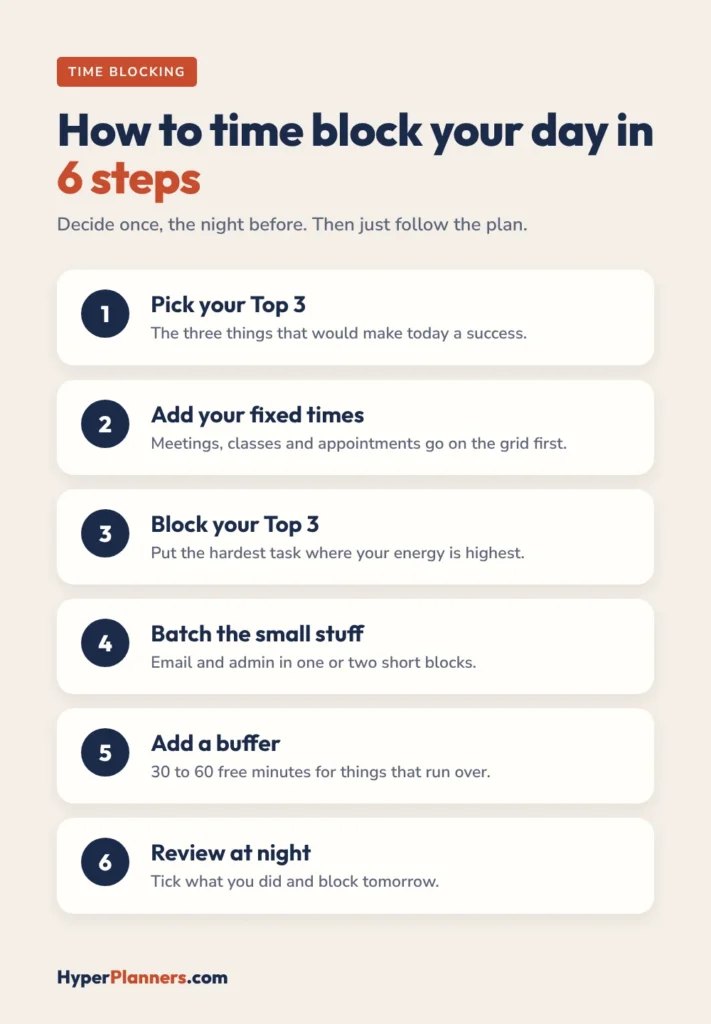
- Pick your Top 3. Write down the three things that would make today a success. Everything else is optional.
- Add your fixed times. Put meetings, classes, appointments and school runs on the grid first. These can’t move.
- Give each Top 3 task a block. Put your hardest task in the time of day you have the most energy, often the morning.
- Batch the small stuff. Group email, messages and admin into one or two short blocks instead of scattering them all day.
- Add a buffer block. Leave 30 to 60 minutes free. Something will run over, and the buffer catches it.
- Review at night. Tick what you finished and move the rest to tomorrow. Then block tomorrow while today is fresh. Once a week, zoom out with a weekly planner.
The first few days will feel off. You will underestimate how long things take. That’s normal, and it is exactly what time blocking is meant to reveal. Make your blocks longer than you think, and adjust as you learn.
Example: A Time-Blocked Day
Here is what a simple time-blocked workday can look like:
| Time | Block | Type |
|---|---|---|
| 8:00 to 8:15 | Plan the day, check Top 3 | Planning |
| 8:15 to 10:15 | Write the client proposal | Deep work (Top 3) |
| 10:15 to 10:45 | Email and messages | Batch |
| 10:45 to 12:00 | Team meeting and follow-ups | Fixed |
| 12:00 to 1:00 | Lunch and a walk | Break |
| 1:00 to 2:30 | Edit the presentation | Deep work (Top 3) |
| 2:30 to 3:30 | Buffer | Buffer |
| 3:30 to 4:30 | Call the supplier, admin tasks | Batch (Top 3) |
| 4:30 to 5:00 | Review today, block tomorrow | Planning |
Notice there is a buffer in the afternoon and that the hardest work sits in the longest morning block. That’s the pattern that makes time blocking hold up on a real day.
5 Time Blocking Mistakes to Avoid
- Filling every minute. A day with no slack breaks at the first delay. Always keep a buffer.
- Blocks that are too short. Most tasks take longer than planned. Start with longer blocks and shrink them later.
- Treating the plan as a contract. When the day changes, move the blocks. Re-blocking is part of the method, not a failure.
- Skipping breaks. Block lunch and short breaks too, or they disappear.
- Never reviewing. The nightly review is where you learn how long things really take.
Time Blocking With ADHD
Strict hour-by-hour schedules can be hard to stick to with ADHD. One late start and the whole day feels lost. A looser version works better for many people: put tasks into parts of the day, like morning, afternoon and evening, instead of exact times.
The free template includes a Loose Time Blocks page built for exactly this. For a full method, read our time blocking for ADHD guide, and see our free ADHD planner, which builds loose blocks into every day.
Paper, Planner or App?
Time blocking works with any tool. Pick the one you will actually open:
- A digital planner: a hyperlinked PDF in GoodNotes or Notability. You can write by hand and duplicate pages. Our free digital planners work well for this. Using an iPad? Follow our time blocking on iPad setup guide.
- A calendar or app: good if your blocks need reminders or you share a calendar with others. See our roundup of the best time blocking apps.
- Paper: print the template below and keep it on your desk.
Free Time Blocking Template
To make it easy to start, we made a free hyperlinked time blocking template. It works in GoodNotes, Notability and any PDF app, or you can print it. Inside:
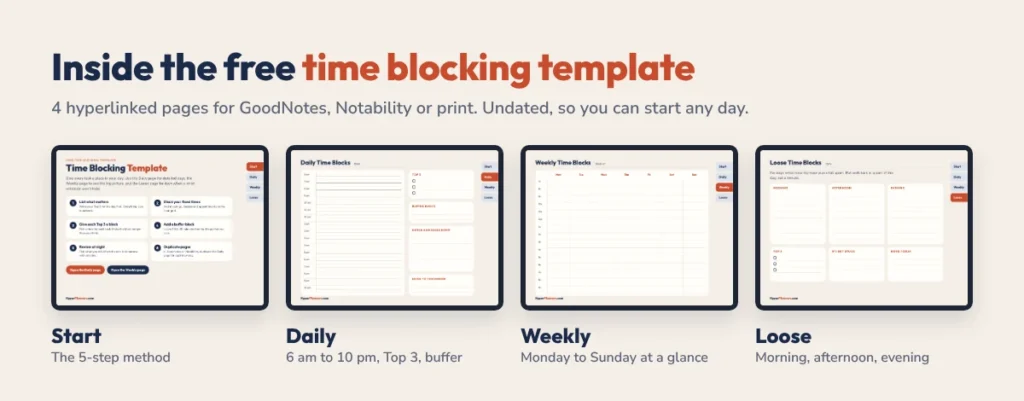
- Start page with the 5-step method
- Daily time blocks from 6 am to 10 pm, with a Top 3, buffer block, brain dump and a “move to tomorrow” box
- Weekly time blocks from Monday to Sunday, 7 am to 9 pm
- Loose time blocks for morning, afternoon and evening, for days when strict plans won’t hold
Tabs on every page take you anywhere in one tap. It is undated, so you can start any day. Students can also use it alongside our free student planner and follow our time blocking for students guide.
Try it now: build your own routine in 2 minutes with our free ADHD daily schedule builder. It plans your day around your energy peak.
Time Blocking FAQ
What is time blocking?
Time blocking is a planning method where you split your day into blocks of time and give each block one task or type of work. You follow the schedule instead of a to-do list.
How long should a time block be?
Most people use blocks of 30 minutes to 2 hours. Use longer blocks for deep, focused work and shorter blocks for batches of small tasks like email.
Is time blocking better than a to-do list?
They work best together. Keep a to-do list to capture tasks, then use time blocking to decide when each important task will actually get done.
Does time blocking work for ADHD?
It can, especially in a looser form. Blocking tasks into parts of the day, like morning or afternoon, is easier to keep up than hour-by-hour schedules.
What should I do when my time blocks fall apart?
Re-block the rest of the day. Move unfinished tasks into your buffer or tomorrow’s plan. Changing the plan is part of time blocking, not a sign it failed.
Start Time Blocking Tomorrow
Tonight, write your Top 3, block them into tomorrow and add one buffer. That’s the whole method. Use the free template to make it easy.