
Pomodoro vs Time Blocking: Which Works Better (and How to Combine Them)
Pomodoro and time blocking are two of the most popular time management methods, and they often get compared as if you have to pick one. You don’t. They solve different problems. Time blocking decides when you work on something. Pomodoro decides how you work once you sit down.
This guide explains both methods, compares them side by side, shows who each one suits and walks you through a simple way to use them together. For the full time blocking method, see our beginner’s guide to time blocking.
Quick answer: Time blocking plans your day by giving each task a block of time on your schedule. The Pomodoro technique is a way to work inside a block: 25 minutes of focus, then a 5-minute break, with a longer break after four rounds. Time blocking is better for planning a full day, Pomodoro is better for getting started and staying focused. Most people get the best results by combining them.
What Is the Pomodoro Technique?
The Pomodoro technique was created by Francesco Cirillo in the late 1980s, while he was a university student. He used a tomato-shaped kitchen timer, and “pomodoro” is Italian for tomato. The method is simple:
- Pick one task. Just one, like “Read chapter 3” or “Draft the intro”.
- Set a timer for 25 minutes. Work only on that task until it rings.
- Take a 5-minute break. Stand up, stretch, get water. Don’t open your inbox.
- Repeat. Each 25-minute round is one “pomodoro”.
- Take a longer break after four rounds. 15 to 30 minutes, then start again.
The magic is in the short timer. Twenty-five minutes feels small enough to start, even on a task you have been avoiding. And because a break is always close, it is easier to resist checking your phone mid-task.
What Is Time Blocking?
Time blocking means planning your day as a schedule instead of a to-do list. Every task gets its own block: 9 to 10:30 for the report, 10:30 to 11 for email, 2 to 3 for the client call. When a block starts, you work on that task until the block ends.
It works because it forces you to be honest about your day. Ten tasks fit easily on a list. They rarely fit into eight hours. Time blocking shows you that in the morning, not at 6 pm.
Pomodoro vs Time Blocking: Side by Side
| Pomodoro technique | Time blocking | |
|---|---|---|
| Main question | How do I focus right now? | When will I do each task? |
| Time frame | 25-minute rounds | The whole day or week |
| Planning needed | Almost none | 10 to 15 minutes a day |
| Best for | Starting tasks, staying focused | Priorities, deadlines, busy days |
| Built-in breaks | Yes, every 25 minutes | Only if you block them |
| Weak spot | No plan for the day | Doesn’t help you start a block |
| Tools | A timer | A planner or calendar |
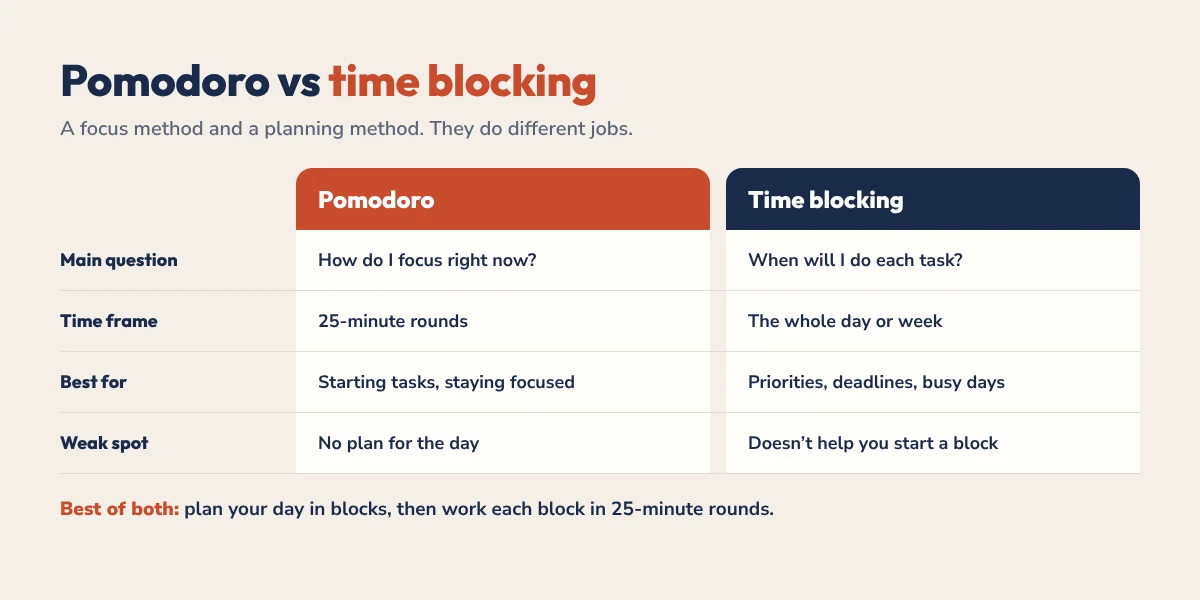
Put simply, time blocking is a planning method and Pomodoro is a focus method. That’s why comparing them head to head misses the point.
When to Use the Pomodoro Technique
- You struggle to start. If “just begin” is the hardest part, a 25-minute timer lowers the bar. Our guide to getting unstuck from task paralysis uses the same idea.
- Your task is boring or repetitive. Short rounds make admin, revision and data entry easier to push through.
- You lose track of time. The timer tells you when to stop, so a quick task doesn’t eat your whole afternoon.
- Your day is unpredictable. If you can’t plan hours ahead, you can still do one focused round at a time.
When to Use Time Blocking
- You have more tasks than time. Blocking shows what really fits and what has to move.
- You have deadlines. Putting the work on your schedule makes sure it happens before the due date.
- Important work keeps getting pushed back. A morning block protects it from meetings and messages.
- You switch tasks all day. One block, one job cuts down the constant jumping.
How to Combine Pomodoro and Time Blocking
The two methods fit together naturally: time blocking gives you the plan, and Pomodoro helps you follow it. Here is a simple way to set it up:
- Block your day first. Pick your Top 3 tasks and give each one a block on your schedule.
- Size your blocks in pomodoros. A 2-hour block holds four pomodoros with short breaks. A 1-hour block holds two.
- Run the timer inside each block. When the block starts, set 25 minutes and work only on that task.
- Use the breaks for nothing. Short breaks are for moving, not for email. Email gets its own block.
- Track your rounds. Draw a small tomato or tick next to the block each time you finish one. After a week, you will know how many rounds your tasks really take.
That last step is the hidden benefit. Counting pomodoros teaches you how long your work takes, which makes your future time blocks far more realistic.
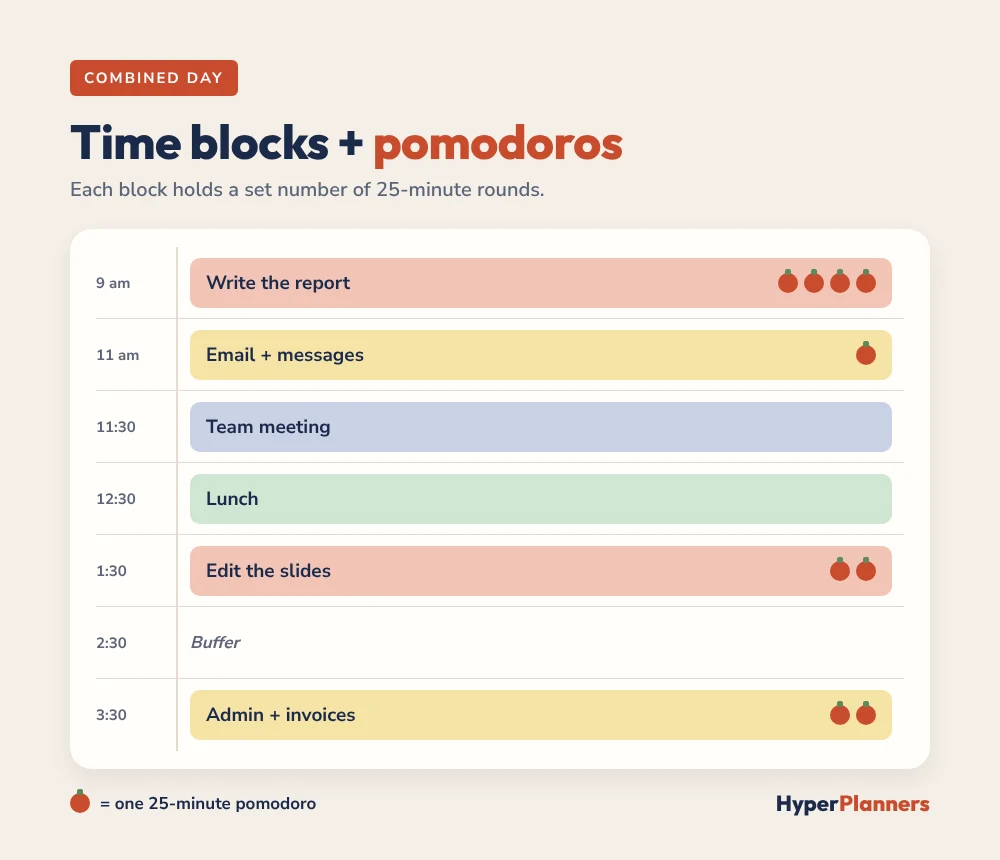
Example: A Combined Day
| Time | Block | Pomodoros |
|---|---|---|
| 9:00 to 11:00 | Write the report | 4 rounds + breaks |
| 11:00 to 11:30 | Email and messages | 1 round |
| 11:30 to 12:30 | Team meeting | None (fixed) |
| 12:30 to 1:30 | Lunch | Break |
| 1:30 to 2:30 | Edit the slides | 2 rounds |
| 2:30 to 3:30 | Buffer | None |
| 3:30 to 4:30 | Admin and invoices | 2 rounds |
Adjusting the Timer for Your Brain
Twenty-five minutes is a starting point, not a rule. Try these variations and keep the one that works:
- 15 / 5: for hard starts and low-energy days.
- 25 / 5: the classic Pomodoro, good for most tasks.
- 50 / 10: for deep work once you are in the flow, like writing or coding.
If you have ADHD, short rounds and loose blocks often work better than rigid schedules. Our time blocking for ADHD guide covers a looser approach that pairs well with a short timer. Studying? See time blocking for students for study block lengths and an exam plan.
Tools for Pomodoro and Time Blocking
You don’t need much. A kitchen timer or your phone’s timer covers the Pomodoro side. For time blocking, use a planner or calendar you will actually open. A digital planner on iPad works well, because you can redraw blocks when the day changes. Our time blocking on iPad guide shows the full setup. Prefer an app? See our roundup of the best time blocking apps.
Try it now: our free ADHD focus tool has a 15, 25 or 50-minute timer, a task breaker and a dopamine boost button for when you feel stuck.
Pomodoro vs Time Blocking FAQ
Is Pomodoro better than time blocking?
Neither is better, because they do different jobs. Time blocking plans when tasks happen, and Pomodoro helps you focus while you do them. Most people get the best results by using both.
Can you use Pomodoro and time blocking together?
Yes. Plan your day in time blocks, then work in 25-minute Pomodoro rounds inside each block. A 2-hour block fits about four pomodoros with breaks.
How long is one pomodoro?
A classic pomodoro is 25 minutes of focused work followed by a 5-minute break. After four rounds, you take a longer break of 15 to 30 minutes.
Does the Pomodoro technique work for ADHD?
Many people with ADHD find short, timed rounds helpful for starting tasks and noticing time passing. Some prefer shorter rounds, like 15 minutes, especially on low-energy days.
What is the difference between timeboxing and time blocking?
Time blocking reserves time on your schedule for a task. Timeboxing adds a hard limit: when the time is up, you stop, finished or not. Pomodoro is a form of timeboxing.
Try Both This Week
Tomorrow, block your Top 3 tasks, then work each block in 25-minute rounds. Count your pomodoros. By Friday you will know how long your work really takes, and your plans will start to match your days.