
Reclaim.ai for Students With ADHD: Plan Your Semester on Autopilot
Disclosure: some links in this guide are affiliate links. If you sign up through them, we may earn a commission at no extra cost to you. How we handle affiliate links.
The syllabus says the essay is due in three weeks. That feels like forever, until it’s Sunday night and it isn’t. If you’re a student with ADHD, that pattern probably sounds familiar. You know what needs doing. The hard part is seeing when to do it, starting, and adjusting when a lecture moves or a shift runs late.
Reclaim.ai is an AI calendar that takes over much of that work. You give it your assignments, study goals and routines, and it finds real time for them in your week, then moves them when plans change. This guide shows how to set it up for a semester, what the free plan covers and how to get the 50% education discount.
Quick answer: Reclaim.ai works well for students with ADHD because it turns deadlines into scheduled study blocks and moves them automatically when your week changes. Start with the free Lite plan, add assignments as tasks with due dates and time estimates, and set one study habit. If you upgrade, students and educators can get 50% off any paid plan for up to 12 months with a school email.

Why Student Life Is Hard on ADHD Brains
- Deadlines feel far away until they don’t. Time blindness makes “due in three weeks” and “due tomorrow” feel almost the same, until the last few days.
- Every week looks different. Lectures, labs, shifts, sport and social plans change, so a fixed timetable breaks quickly.
- Big assignments are hard to start. “Write the essay” has no obvious first step, so it waits.
- Re-planning takes energy. Rebuilding your week every time something moves is the step most people skip.
Read more about why this happens in our guide to ADHD time blindness.
What Reclaim Does for Students
Reclaim connects to Google Calendar or Outlook and works on top of it. For students, five features matter most:
- Tasks with due dates. Add “History essay, 6 hours, due Friday the 14th”. Reclaim splits it into study blocks and places them before the deadline.
- Habits. Set “Review notes, 30 minutes, weekdays” or “Gym, 3 times a week”. They move when something clashes instead of disappearing.
- Focus time. Protect a weekly amount of deep work so group chats and meetings don’t eat every free hour.
- Buffers. Add breaks between classes and calls so your day isn’t back to back.
- At-risk warnings. If your week is too full to finish something on time, Reclaim shows it before the deadline, not after.
For the full feature list and limits, read our Reclaim.ai review for ADHD.
Set Up Reclaim for Your Semester (20 Minutes)
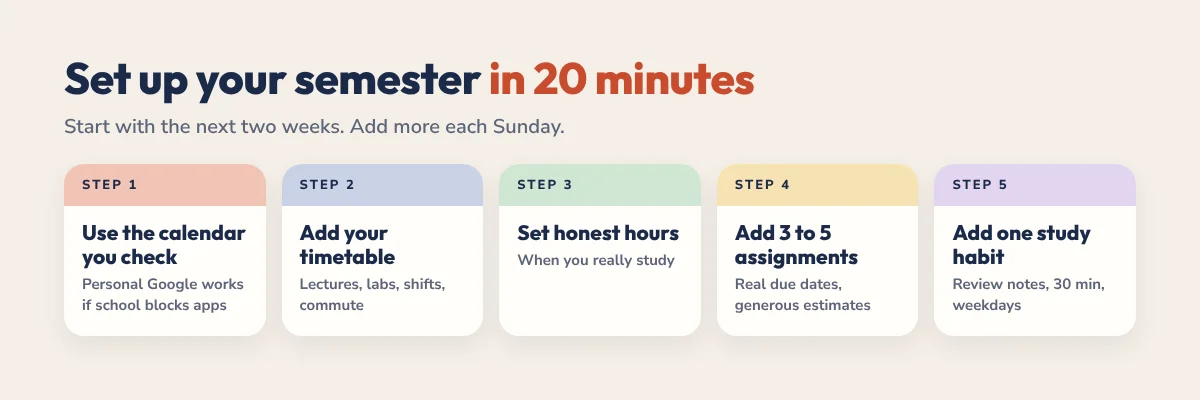
- Sign up with the calendar you actually check. Some schools restrict third-party apps on student accounts. If yours does, use a personal Google account and subscribe to your class timetable there.
- Add your fixed timetable. Lectures, labs, work shifts and commute time go in as normal events so Reclaim plans around them.
- Set honest working hours. If you never study before 10am, don’t tell Reclaim you do.
- Add your next 3 to 5 assignments as tasks. Use the real due date and a generous time estimate. If you think 4 hours, put 6.
- Add one study habit. For example, “Review notes, 30 minutes, weekdays, afternoons”.
- Check your calendar on Monday morning. Use Preview Mode to see where things landed, then start the first block when it begins.
ADHD tip: split big assignments by stage, not by hours. “Essay: research”, “Essay: outline” and “Essay: draft” are easier to start than “Essay part 2 of 4”.
A Sample Week
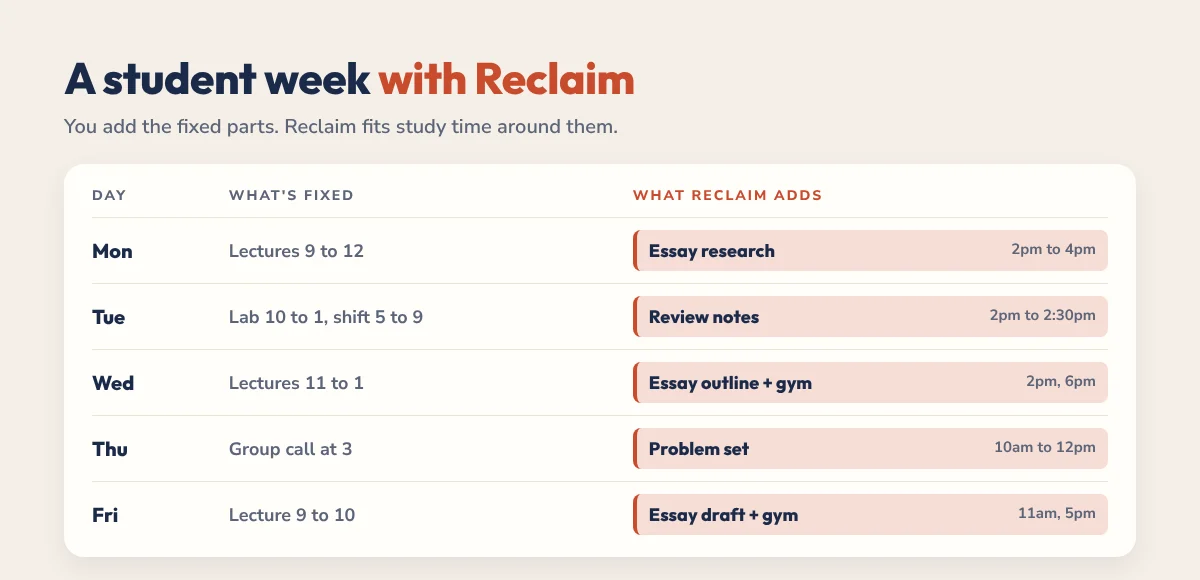
| Day | What’s fixed | What Reclaim adds |
|---|---|---|
| Monday | Lectures 9 to 12 | Essay research, 2pm to 4pm |
| Tuesday | Lab 10 to 1, shift 5 to 9 | Review notes, 2pm to 2:30pm |
| Wednesday | Lectures 11 to 1 | Essay outline, 2pm to 3:30pm. Gym at 6pm |
| Thursday | Group project call at 3 | Problem set, 10am to 12pm. Review notes after lunch |
| Friday | Lecture 9 to 10 | Essay draft, 11am to 1pm. Gym at 5pm |
Now imagine your group project call moves from Thursday to Wednesday at 2pm. You don’t rebuild anything. Reclaim moves the essay outline to another free slot and keeps the deadline safe.
The 50% Education Discount
Reclaim offers 50% off any paid plan for up to 12 months for students, educators and school staff at accredited, degree-granting institutions. Here’s how it works, based on Reclaim’s help centre:
- Apply on Reclaim’s Education Discount page with your school email.
- Reclaim reviews applications on weekdays and usually replies within a couple of days.
- If approved, you get a discount code to use at checkout. It works on monthly or annual plans, but not Enterprise.
- Discounts can’t be combined, and codes work on first purchases, not renewals.
Do you even need to pay? Many students can stay on the free Lite plan, which includes 1 calendar sync, unlimited tasks, unlimited buffers, 1 habit and 1 scheduling link. Upgrade if you want more habits, more connected calendars or task app integrations like Todoist. Prices and terms change, so check Reclaim’s pricing page for current details.
Reclaim vs a Student Planner: Use Both
Reclaim is great at when. It isn’t a place to think, write down what’s on your mind or see your whole term at a glance. That’s where a planner helps.
| Reclaim.ai | Student planner | |
|---|---|---|
| Best at | Finding and protecting study time | Seeing the whole term and choosing priorities |
| Deadlines | Turns them into study blocks | Lists them by week and month |
| When plans change | Moves blocks automatically | Gives you a calm place to reset |
| Daily use | Glance at your calendar | Write today’s Top 3 and brain dump |
A simple routine: each Sunday, open your planner, list the week’s deadlines and add any new ones to Reclaim. Each morning, write your Top 3 and let Reclaim handle the timing. Our 2026-2027 Academic Planner has a timetable, deadline tracker and exam countdown, and the 2027 ADHD Planner adds brain dumps and a no-guilt restart on every page. Want to try first? Grab our free student planner.
Common Mistakes Students Make
- Adding the whole semester on day one. Start with the next two weeks, then add more each Sunday.
- Tiny time estimates. If everything is “1 hour”, your week looks fine on paper and falls apart in real life.
- Fake due dates. Use the real deadline, or a day before. Reclaim plans around what you tell it.
- Dragging blocks around all day. If tasks keep moving, your week is overloaded. Drop or delay a task instead.
- Skipping the weekly check. Five minutes on Sunday keeps the whole system honest.
More help: our guides to time blocking for students, time management for students and the ADHD digital planner for college students. Using Todoist for coursework? Follow our Todoist and Reclaim setup guide.
Is Reclaim Worth It for Students?
If you use Google Calendar or Outlook and your weeks keep falling apart, Reclaim is one of the most useful tools you can add, and the free plan is enough to find out. Set up your next few assignments, give it two weeks and see whether starting feels easier. If it does, the education discount makes upgrading much cheaper.
Prefer paper for planning your week? Pair Reclaim with our free weekly study planner template.
FAQ
Is Reclaim.ai free for students?
Reclaim has a free Lite plan anyone can use, including students. It includes 1 calendar sync, unlimited tasks, unlimited buffers, 1 habit and 1 scheduling link. Paid plans add more habits, calendars and integrations.
Does Reclaim have a student discount?
Yes. Reclaim offers 50% off any paid plan except Enterprise for up to 12 months to students, educators and staff at accredited, degree-granting institutions. You apply on its Education Discount page with your school email.
Is Reclaim good for students with ADHD?
For many students, yes. It turns deadlines into scheduled study blocks, protects focus time and moves things when plans change, which helps with time blindness and the effort of constant re-planning.
Does Reclaim work with my school email?
Reclaim works with Google Calendar and Outlook. Some schools restrict third-party apps on student accounts. If yours does, connect a personal Google account and add your timetable there.
Can Reclaim schedule my assignments automatically?
Yes. Add each assignment as a task with a due date and time estimate, and Reclaim places study blocks before the deadline. It can split long tasks across several days.
Do I still need a planner if I use Reclaim?
A planner helps with the parts Reclaim doesn’t cover: seeing the whole term, choosing daily priorities and brain dumping. Many students use both.