
How to Auto-Schedule Todoist Tasks With Reclaim (ADHD Guide)
Disclosure: some links in this guide are affiliate links. If you sign up through them, we may earn a commission at no extra cost to you. How we handle affiliate links.
A to-do list tells you what needs doing. It doesn’t tell you when. For many people with ADHD, that gap is where tasks go to die: the list keeps growing, nothing has a time, and every morning starts with the same question of what to do first.
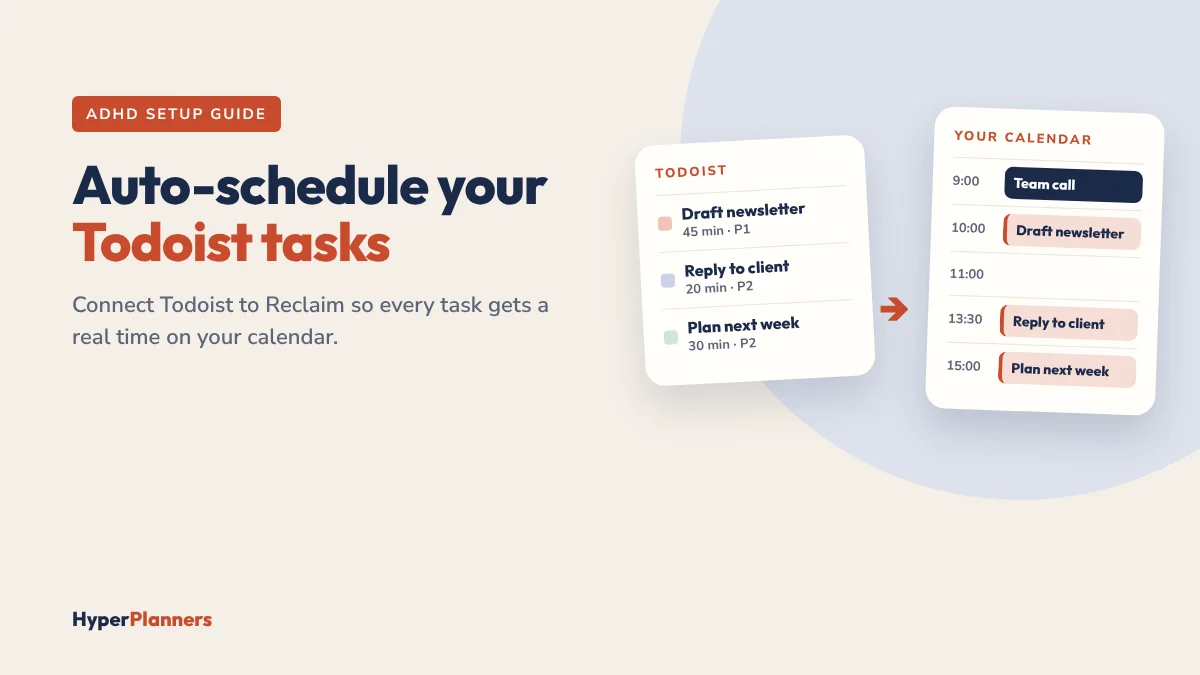
Connecting Todoist to Reclaim.ai closes that gap. Your tasks stay in Todoist, and Reclaim turns them into real blocks on your calendar, then moves them when your day changes. This guide shows how to set it up in about 15 minutes and how to keep it ADHD-friendly.
Quick answer: To auto-schedule Todoist tasks, connect Todoist in Reclaim under Settings, then Integrations. Choose which projects or labels to sync, give tasks a due date and a time estimate, and Reclaim places them in your free calendar time based on priority. It reschedules them when meetings move. Task integrations are part of Reclaim’s paid plans, and new accounts get a free trial to test them.
Why Todoist + Reclaim Works for ADHD
- Tasks get a time, not just a place on a list. A task with a slot on your calendar is far easier to start than one floating in a list.
- No daily re-planning. When a meeting appears, Reclaim moves your task instead of you rebuilding the afternoon.
- You see when you’re overloaded. If tasks don’t fit before their due dates, Reclaim shows they’re at risk, which helps with time blindness.
- You keep the app you know. You still add tasks quickly in Todoist on your phone.
Before You Connect: Prepare Todoist (5 Minutes)

Reclaim schedules what you give it, so a little setup in Todoist makes a big difference.
- Create one “Schedule” project or label. Only sync tasks that need calendar time. Quick errands can stay as a plain list.
- Add due dates. Reclaim uses them to decide what goes first and to warn you when something is at risk.
- Add time estimates. Reclaim uses your Todoist estimate to size each block, and defaults to one hour if there isn’t one. Todoist’s duration field is part of its paid plans.
- Set priorities. Todoist priorities 1 to 4 tell Reclaim what matters most.
- Turn off Todoist’s own calendar sync if you use it, so you don’t get duplicate events.
ADHD tip: make your estimates generous. If you think a task takes 30 minutes, put 45. Reclaim can only protect the time you ask for.
Connect Todoist to Reclaim (Step by Step)
- Open Reclaim and go to Settings, then Integrations.
- Choose Todoist and click Connect.
- Sign in to Todoist and approve the permissions.
- Pick what to sync: the “Schedule” project or label you created.
- Set defaults: a default task length and whether tasks belong in working or personal hours.
- Check Preview Mode in Reclaim 2.0 to see where tasks land, then apply.
New to Reclaim? Read our Reclaim.ai review for ADHD first for the full picture, including pricing.
What Happens After You Connect
- Reclaim places each synced task in a free slot before its due date, highest priority first.
- Long tasks can be split into smaller blocks across several days.
- When a meeting lands on a task block, Reclaim moves the task to the next good slot.
- When you finish, mark the task done so it drops off your calendar.
Two things to know: recurring Todoist tasks don’t schedule well, so use Reclaim Habits for routines like a daily plan or exercise. And in shared Todoist projects, tasks need to be assigned to you to sync.
An ADHD-Friendly Daily Routine
- Morning (3 minutes): open your planner and write today’s Top 3. Make sure they’re in your Todoist “Schedule” project with a due date.
- Check your calendar: Reclaim has already placed them. Start the first block when it begins.
- When plans change: let Reclaim move things. Glance at Preview Mode instead of re-planning by hand.
- Evening (2 minutes): tick off what’s done and brain dump anything new into Todoist.
Pair this with a visual timer for each block. Our free ADHD focus tool has one, and our guide to the best visual timers for ADHD covers physical options.
Todoist Alone vs Todoist + Reclaim
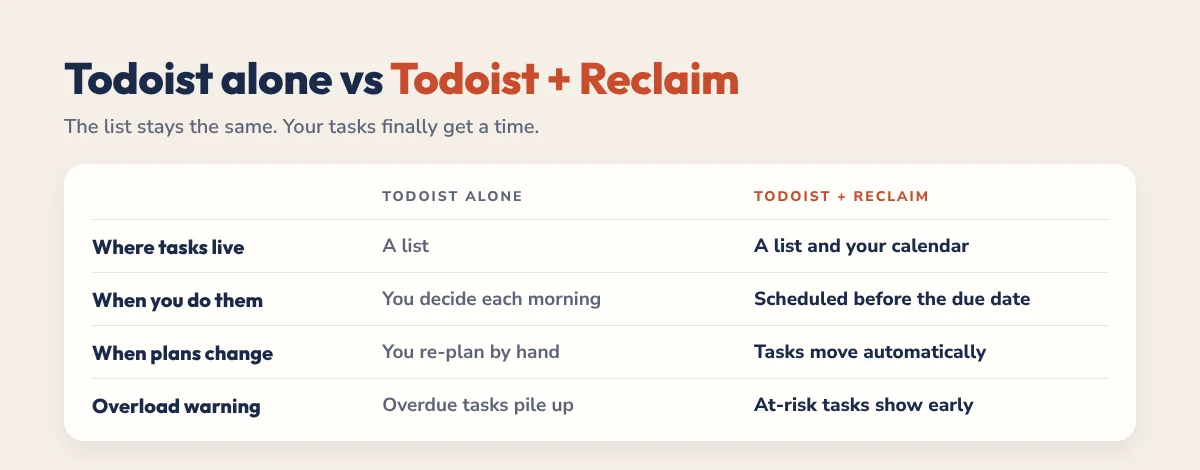
| Todoist alone | Todoist + Reclaim | |
|---|---|---|
| Where tasks live | A list | A list and your calendar |
| When you do them | You decide each morning | Scheduled for you before the due date |
| When plans change | You re-plan by hand | Tasks move automatically |
| Overload warning | Overdue tasks pile up | At-risk tasks show before the deadline |
| Best for | Quick capture | Turning tasks into finished work |
A real example: on Monday you add “Draft newsletter” to your Schedule project with a 45-minute estimate, priority 1 and a Wednesday due date. Reclaim places it on Tuesday at 10:00. On Tuesday morning a call lands at 10:00, so Reclaim moves the draft to 13:30 without you touching anything. You open your calendar, see the new time and start when the block begins.
Common Mistakes
- Syncing every task. Your calendar fills with tiny items. Sync only tasks that need focused time.
- No time estimates. Everything becomes one hour by default, and your day stops being realistic.
- Far-off due dates for urgent work. Reclaim schedules by due date, so be honest about when things really need to happen.
- Fighting the automation. If tasks keep moving, your week is overloaded. Remove a task instead of dragging blocks around.
Is It Worth It?
If you already use Todoist and work from Google Calendar or Outlook, connecting Reclaim is one of the most practical upgrades you can make for ADHD. Start the free trial, sync one project for a week and see whether starting tasks feels easier. If it does, Reclaim’s Starter plan is where task integrations live.
Want a place for the thinking part of planning? Our 2027 ADHD Planner has a daily Top 3, brain dump and energy check that sit alongside Todoist and Reclaim. Try the free 31-page ADHD Lite first, or read how ChatGPT and Claude compare with Reclaim.
FAQ
Does Reclaim work with Todoist?
Yes. Reclaim connects to Todoist and schedules your tasks into free calendar time based on due dates, priorities and time estimates. It reschedules them when your calendar changes.
Is the Todoist integration free in Reclaim?
Task integrations are part of Reclaim’s paid plans, starting with Starter. New accounts get a free trial, so you can test the Todoist integration before paying.
Do I need Todoist Pro to use Reclaim?
No, Reclaim works with Todoist’s free plan. Todoist’s paid plans add a duration field, which Reclaim can use to size your task blocks. Without it, Reclaim uses your default task length.
Why are my Todoist tasks not showing in Reclaim?
Check that the task is in a synced project or label, has a due date, is assigned to you if it’s in a shared project and isn’t a recurring task.
Is Todoist and Reclaim good for ADHD?
For many people, yes. Todoist makes capturing tasks quick, and Reclaim turns them into scheduled time that moves when plans change, which removes a lot of daily re-planning.