
How to Protect Focus Time With ADHD (When Meetings Eat Your Day)
Disclosure: some links in this guide are affiliate links. If you sign up through them, we may earn a commission at no extra cost to you. How we handle affiliate links.
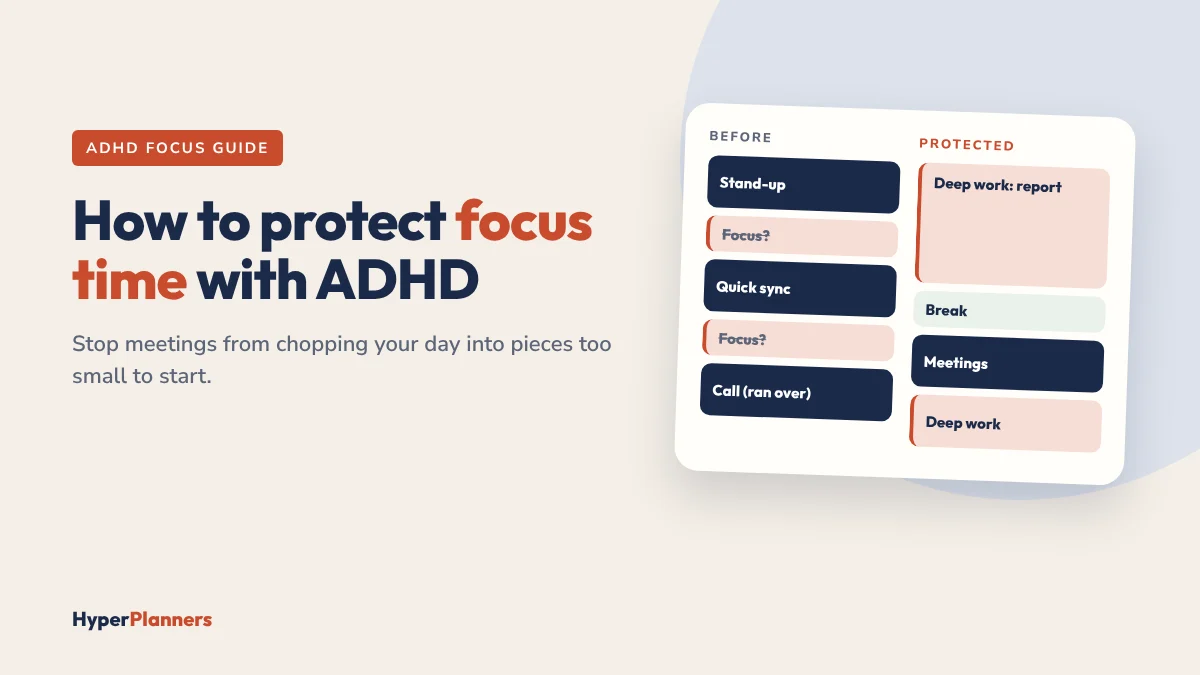
You start Monday with a plan: two hours on the report, every morning, all week. By Wednesday, a stand-up, two “quick syncs” and a call that ran over have chopped every morning into 30-minute pieces. The report gets done at 9pm on Thursday, and you wonder why you can’t focus like other people.
With ADHD, focus isn’t just about willpower. It’s about having a long enough, quiet enough block of time to get started, and keeping it when everyone else wants a piece. This guide shows how to protect that time, step by step, with scripts for saying no and the tools that defend it for you.
Quick answer: To protect focus time with ADHD, schedule it during your best hours, make each block at least 90 minutes, mark it as busy so people can’t book over it, and keep a meeting-free part of the day. Set a weekly focus goal instead of one fixed block, so lost time gets moved instead of lost. An AI calendar like Reclaim.ai can do this automatically by finding focus time in your week and moving it when meetings land.
Why Focus Time Disappears Faster With ADHD
- Starting takes longer. Many ADHD brains need a warm-up before deep work. A 30-minute gap between meetings often ends before focus begins.
- Switching is expensive. Every meeting means stopping, switching and restarting. Three short meetings can cost a whole morning.
- Saying no is hard. An open slot on your calendar looks like free time to everyone else, and declining in the moment feels awkward.
- Time blindness hides the damage. It’s hard to notice your week filling up until there’s no focus time left. Our guide to ADHD time blindness explains why.
- Work spills into evenings. When the day disappears into meetings, deep work moves to late nights, which is tiring and hard to keep up.
7 Ways to Protect Your Focus Time
1. Find your best focus hours
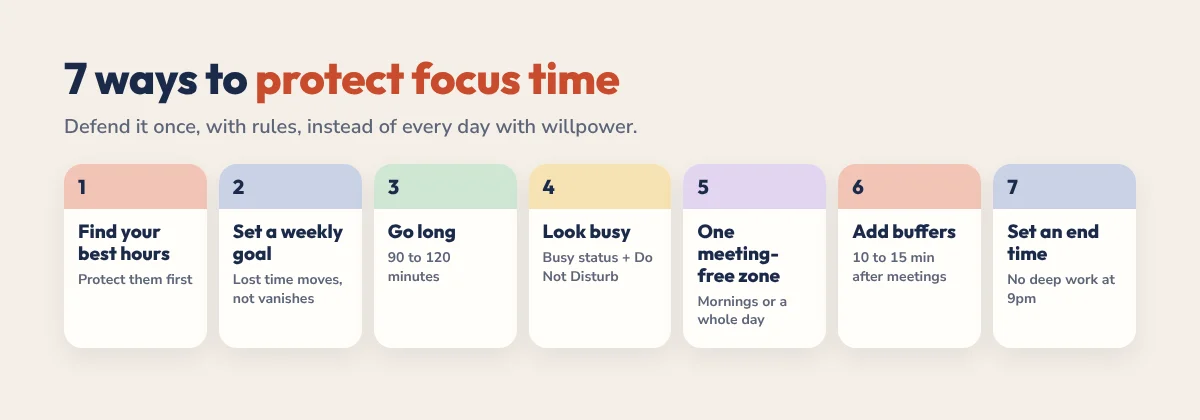
For one week, note when starting feels easiest. Many people find a window of two to four hours that works better than the rest of the day. Protect that window first. Meetings can go in the hours when your focus is lower anyway.
2. Set a weekly focus goal, not one fixed block
Instead of “9 to 11 every day”, aim for something like “10 hours of focus time this week”. When a meeting lands on Tuesday morning, the goal still stands and the time moves to another slot. A fixed block, once lost, is usually lost for good.
3. Make blocks long enough to matter
Aim for 90 to 120 minutes. That gives you time to warm up, get into the work and finish something. If 90 minutes feels too long, split it into focus sprints with a visual timer, but keep the whole block free.
4. Make your focus time look busy
A block labelled “Focus” but marked as free is an invitation. Mark it as busy, give it a clear name like “Deep work: report” and turn on Do Not Disturb during it. Google Workspace users can use Google Calendar’s Focus Time event, which can decline new invites automatically.
5. Keep one meeting-free zone
Pick a protected part of the day or week, such as mornings before 11 or every Wednesday. Tell your team once, then let your calendar enforce it. A rule is easier to defend than a dozen separate decisions.
6. Add buffers around meetings
Leave 10 to 15 minutes after meetings to write notes, get a drink and reset. Without buffers, a meeting that runs over eats straight into your next focus block.
7. Set a firm end time
Decide when your workday ends and put it on your calendar. If focus work keeps sliding past it, that’s a sign your week has too many meetings or too many tasks, not that you need to work later.
Manual vs Automatic Focus Time
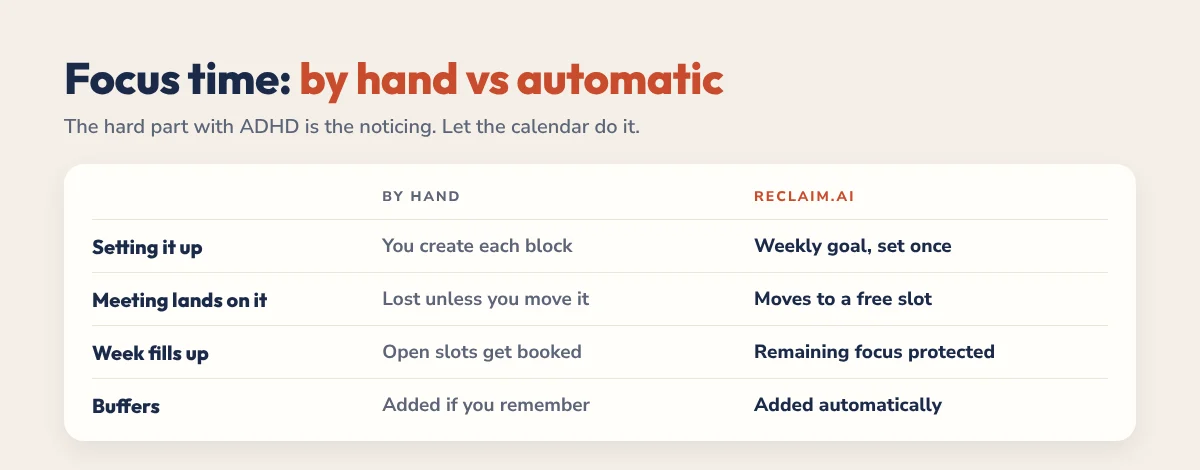
You can do all of this by hand in Google Calendar or Outlook. The catch is that you have to keep noticing and re-planning, which is the hard part with ADHD. An AI calendar does the noticing for you.
| By hand (Google Calendar, Outlook) | Automatic (Reclaim.ai) | |
|---|---|---|
| Setting it up | You create each focus block | You set a weekly focus goal once |
| When a meeting lands on it | Focus time is lost unless you move it | Focus time moves to another free slot |
| As the week fills up | Open slots get booked | Remaining focus time is protected |
| Buffers | Added by hand, if you remember | Added automatically after meetings |
| Seeing the damage | You notice at the end of the week | You see focus hours at risk early |
Reclaim.ai works on top of Google Calendar and Outlook. It finds focus time in your week based on your goal, moves it when plans change and adds breaks between meetings. You can start on the free plan. Read our Reclaim.ai review for ADHD or see how it compares in Reclaim vs Google Calendar.
A Protected Day, Start to Finish
| Time | What happens |
|---|---|
| 8:45am | Two-minute plan: write today’s Top 3 in your planner |
| 9am to 11am | Focus block (busy, Do Not Disturb on) |
| 11am to 11:15am | Break and messages |
| 11:15am to 1pm | Meetings and calls |
| 1pm to 2pm | Lunch, away from your desk |
| 2pm to 3:30pm | Second focus block, or a moved one if the morning was lost |
| 3:30pm to 5pm | Admin, email and small tasks |
| 5pm | Shutdown: tick off, brain dump tomorrow’s tasks, close the laptop |
Two focus blocks a day is a strong week for most people. If you get one, that’s still a win.
What to Say When Someone Wants Your Focus Time
Short, friendly scripts make it easier to say no without overthinking it:
- “I’ve got a deep work block then. Could we do 2pm instead?”
- “I keep mornings meeting-free so I can finish project work. Does any afternoon this week work?”
- “Can we handle this in a message? I’ll reply by end of day.”
- “I can join for the first 15 minutes, then I need to get back to the report.”
You don’t need to explain your ADHD or apologise. A clear alternative is usually all people need.
Pair Your Calendar With a Planner
A calendar protects the time. A planner decides what goes into it. Before each focus block, write the one task you’ll work on, so you don’t spend the first 20 minutes choosing. Our 2027 ADHD Planner has a daily Top 3, brain dump and energy check that make this quick. Try the free 31-page ADHD Lite first, or read our guides to time blocking for ADHD and Pomodoro vs time blocking.
The Bottom Line
Focus time with ADHD rarely survives by accident. Pick your best hours, set a weekly goal, make blocks long and visibly busy, and keep one meeting-free zone. If keeping it all up by hand is the part that keeps failing, let an AI calendar defend it for you and give it two weeks.
FAQ
How long should a focus block be with ADHD?
Many people with ADHD do best with 90 to 120 minute blocks, which leave time to warm up and finish something. If that feels too long, split the block into shorter sprints with breaks, but keep the whole block free of meetings.
How do I stop meetings from taking over my focus time?
Mark focus blocks as busy, keep a meeting-free part of the day or week, and offer an alternative time when someone asks for a meeting. An AI calendar like Reclaim.ai can also move focus time automatically when meetings land.
What is focus time in Google Calendar?
Focus Time is a Google Calendar event type for Google Workspace accounts. It marks time for deep work and can automatically decline new meeting invites during that block. It doesn’t move to a new slot when your day changes.
Does Reclaim.ai protect focus time?
Yes. You set a weekly focus goal, and Reclaim finds time for it in your calendar, protects it as your week fills up and moves it when meetings take its slot. It works with Google Calendar and Outlook.
Why can’t I focus even when I have free time?
Short gaps between meetings often end before focus begins, especially with ADHD. Longer blocks, a clear first task and a short starting ritual like a visual timer make it easier to get going.