Most productivity tools were built for neurotypical brains. They assume you can estimate how long things take. They assume you will open the app every morning and follow a plan. They assume willpower is the missing ingredient. If you have ADHD, you already know those assumptions are wrong — and you have a graveyard of abandoned apps to prove it.
AI tools in 2026 are different. The best ones do not demand consistency from you. They adapt when you fall off. They make decisions you cannot make. They reduce the friction between knowing what to do and actually doing it. I tested over a dozen AI productivity tools specifically through the lens of ADHD — not just features, but whether they survive contact with a brain that works differently. These seven earned their place. For managing your social media alongside these tools, check out our Metricool review.
What Makes an AI Tool Actually ADHD-Friendly?
The 6 Criteria I Used to Test Every Tool
An AI tool can be powerful and still be terrible for ADHD. Complexity is the enemy. If a tool requires a 45-minute setup, three integrations, and a YouTube tutorial before it becomes useful, it is dead on arrival for most ADHD brains. Here are the criteria I used to evaluate every tool on this list:
- Auto-reschedules when life happens: ADHD plans collapse daily. The best tools rebuild your schedule automatically instead of leaving you staring at a broken plan wondering where to start.
- Low setup cost: Useful within the first 10 minutes. If it takes longer than that, the dopamine window closes and the app joins the graveyard.
- Forgiving when you fall off: You will skip days. You will forget to log things. ADHD-friendly tools do not punish inconsistency — they pick up where you left off without guilt trips or broken streaks.
- Minimal manual steps: Every manual step is a friction point. Every friction point is a reason to stop. The fewer decisions and inputs required, the more likely the tool survives past week two.
- Clean interface: Visual clutter triggers overwhelm. A simple screen with one clear action beats a dashboard with seventeen widgets.
- Works on iPad: Many ADHD adults plan on iPad with Apple Pencil. Tools that work well on tablet get bonus points.
If a tool scored poorly on more than two of these criteria, it did not make the list — no matter how impressive the feature set.
1. Reclaim.ai — Best for Time Blindness and Auto-Scheduling
What Reclaim.ai Does for ADHD Time Management

Time blindness is the ADHD symptom that wrecks more plans than anything else. You genuinely cannot feel how long thirty minutes is. You cannot sense a deadline approaching until it is already here. And manually scheduling your day requires the exact executive function skills that ADHD impairs.
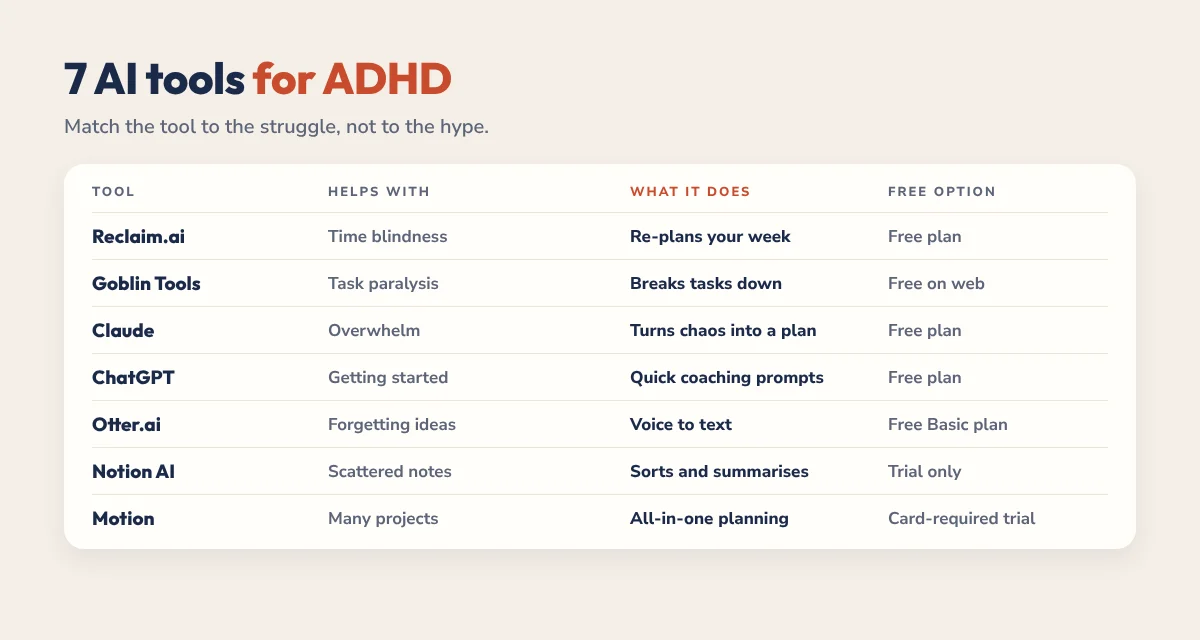
What it does: Reclaim.ai connects to Google Calendar and automatically schedules your tasks, habits, and focus time around your meetings and commitments. You tell it what needs to happen and when it is due. Reclaim figures out when to put it on your calendar. When something shifts — a meeting runs long, a task takes longer than expected — Reclaim rearranges everything else without you lifting a finger.
Why it works for ADHD: It removes you from the scheduling equation. You do not have to decide when to work on things. You do not have to manually rearrange your day when plans change. Reclaim acts as an external time-awareness system — the thing your ADHD brain does not have built in. It also protects focus time blocks, which means your deep work does not get eaten by reactive tasks and random meetings.
Reclaim.ai Pricing and Verdict
Pricing: Free plan with core scheduling features. Starter at $10/month adds unlimited habits and task scheduling. Business at $15/month.
Pros: Genuinely useful free plan. Eliminates scheduling decisions. Auto-reschedules when plans break. Protects focus time. Low setup friction.
Cons: Google Calendar only — no Apple Calendar or Outlook. Takes about a week to learn your patterns. Can feel rigid if you prefer spontaneity.
Verdict: The single most impactful AI tool for ADHD time management. Start here, try Reclaim.ai free here. Read our full Reclaim.ai review for ADHD users for the deep dive.
2. Notion AI — Best for Brain Dumps and Getting Thoughts Organized
The ADHD brain runs seventeen threads simultaneously. Ideas, worries, half-formed plans, and random brilliant thoughts all compete for attention. The mental load is exhausting — and the worst part is knowing that if you do not capture something right now, it vanishes forever.
How Notion AI Handles ADHD Brain Dumps

What it does: Notion AI sits inside the Notion workspace and transforms messy input into organized output. Write a chaotic stream-of-consciousness brain dump and Notion AI extracts action items, builds structured outlines, assigns priorities, and generates timelines. It also includes workspace-wide Q&A — ask a question and it searches everything you have ever stored in Notion to find the answer.
Why it works for ADHD: The organizational work — the part that ADHD brains struggle with most — is handled by the AI. You provide the raw chaotic input. Notion AI provides the structure. You do not have to organize your thoughts before capturing them. Just dump everything out and let the AI sort it. The Q&A feature is also invaluable for ADHD because it eliminates the “I know I wrote this somewhere but I cannot find it” problem that plagues every ADHD workspace.
Notion AI Pricing and Verdict
Pricing: Free plan with limited AI queries. Plus at $10/month with full AI access included.
Pros: Turns chaos into structure automatically. Q&A search finds anything in your workspace. Autofill database properties reduce repetitive data entry. Affordable at $10/month.
Cons: Notion itself can overwhelm ADHD brains — the flexibility creates decision paralysis. Writing quality is average compared to Claude. Requires you to already use Notion to get value.
Verdict: Excellent if you already use Notion. If Notion overwhelms you, skip it and use a hyperlinked digital planner instead — same capture benefit with zero setup friction.
3. Claude AI — Best for Breaking Overwhelming Tasks into Micro-Steps
Task initiation is the ADHD bottleneck that nobody talks about enough. You know what you need to do. You might even want to do it. But the task sits there — big, vague, and overwhelming — and your brain refuses to start. This is not laziness. It is an executive function gap: your brain cannot generate the sequence of small steps needed to begin.
Why Claude AI Works for ADHD Task Initiation

What it does: Claude is a general-purpose AI assistant by Anthropic. For ADHD, its superpower is task decomposition. Tell it “I need to write a proposal for a freelance client” and Claude generates a step-by-step sequence of micro-actions: open a document, write one sentence describing the scope, list three deliverables, draft a timeline, add pricing. Each step is small enough that your brain can execute it without triggering avoidance.
Why it works for ADHD: Claude becomes your external executive function. It does the planning work your brain struggles with — breaking big tasks into starter steps, maintaining context across long work sessions, and providing a non-judgmental thinking partner that never makes you feel bad for asking “what do I do next?” The clean, distraction-free interface also matters. No sidebar of plugins. No feature overload. Just a conversation.
Claude AI Pricing and Verdict
Pricing: Free plan with generous daily limits. Pro at $20/month for unlimited access and the latest models.
Pros: Best task decomposition of any AI tool. Clean, focused interface. Excellent long conversation memory. Free plan is genuinely useful. Non-judgmental tone.
Cons: No built-in templates or workflows — you need to know what to ask. Cannot browse the web. No native mobile app on all platforms yet.
Verdict: The best AI thinking partner for ADHD brains. When you are stuck, open Claude and say “break this down for me.” It works every time.
4. Motion — Best for Automatic Daily Schedule Rebuilding
Here is what happens to ADHD plans: you make a beautiful schedule at 8 AM. By 10 AM something unexpected happens. The plan breaks. And your brain — instead of adjusting — shuts down entirely. The structure is gone, so the motivation disappears with it. You spend the rest of the day in reactive mode, doing whatever feels urgent instead of what matters.
How Motion Rebuilds Your ADHD Schedule Automatically

What it does: Motion is an AI-powered calendar and task manager that builds your daily schedule automatically and rebuilds it in real time when things change. Add your tasks with deadlines and priorities. Motion creates an optimized daily plan. When a task runs long or a meeting gets added, Motion recalculates the entire day instantly. You always have a current, accurate plan to follow.
Why it works for ADHD: It eliminates the recovery cost of disrupted plans. When your schedule breaks — and it will — Motion has already rebuilt it before you even notice. You just look at your calendar and do the next thing. This is transformative for ADHD brains that freeze when structure collapses. It also puts high-priority tasks in your peak energy windows, so you are doing your hardest work when your brain is most capable.
Motion Pricing and Verdict
Pricing: Individual plan at $34/month (annual) or $49/month (monthly). No free plan. 7-day free trial.
Pros: Most aggressive auto-rescheduling available. Priority-based scheduling puts hard tasks in peak windows. Deadline awareness warns you before things slip. Genuinely reduces daily planning decisions to zero.
Cons: Expensive — $34/month is steep for a solo tool. No free plan means commitment before testing. Can feel controlling if you resist structure. Learning curve in the first week.
Verdict: The most powerful ADHD scheduling tool available — if you can afford it. If $34/month is too much, Reclaim.ai gives you 80 percent of the value at $10/month.
5. Otter.ai — Best for Voice Capture When Typing Feels Impossible
Some days the ADHD brain has plenty of thoughts but zero capacity to type them. The ideas are there — swirling, rapid-fire, brilliant — but the physical act of opening a notes app, finding the right page, and typing coherent sentences creates enough friction to lose them all. Voice capture solves this by matching the speed of your thoughts.
How Otter.ai Solves ADHD Thought Capture

What it does: Otter.ai records and transcribes speech in real time with AI-powered accuracy. Speak your thoughts and they appear as searchable, organized text. It also transcribes meetings, generates summaries, extracts action items, and identifies different speakers. After recording, it creates a structured summary so you can find the key points without reading the entire transcript.
Why it works for ADHD: Speaking is the lowest-friction capture method. No opening apps. No finding the right page. No organizing thoughts before recording them. Just talk. Otter handles the transcription, organization, and summarization. This is critical during hyperfocus sessions when ideas flow faster than fingers can type, and during low-energy days when typing feels like running through mud.
Otter.ai Pricing and Verdict
Pricing: Free plan with 300 minutes/month. Pro at $16.99/month with 1,200 minutes. Business at $30/month.
Pros: Lowest possible capture friction — just talk. AI summaries extract key points automatically. Searchable transcripts solve “where did I put that idea.” Meeting transcription eliminates split attention. Free plan is generous enough for testing.
Cons: Requires decent audio quality — noisy environments reduce accuracy. Free plan’s 300 minutes can run out quickly if you use it for meetings. No offline transcription on the free plan.
Verdict: Essential for ADHD adults who think out loud. If you lose ideas because you cannot capture them fast enough, Otter is the fix.
6. Goblin Tools — Best Free Tool for Task Breakdown
Goblin Tools is the underdog on this list — a small, free, purpose-built set of AI tools designed specifically for neurodivergent brains. No corporate polish. No enterprise features. Just simple tools that solve specific ADHD problems.
What Goblin Tools Does for ADHD Brains

What it does: The flagship feature is Magic ToDo — paste a task and it breaks it into subtasks automatically, with adjustable “spiciness” (complexity level). There is also a Formalizer (rewrites casual text into professional language), a Judge (estimates how long a task will take), a Compiler (turns scattered notes into organized text), and an Estimator (breaks down time requirements for complex projects).
Why it works for ADHD: It was designed by a neurodivergent developer for neurodivergent users. The Magic ToDo feature directly addresses task initiation paralysis — the same problem Claude solves, but with zero sign-up and zero cost. The spiciness slider is genius: set it low for simple tasks, high for complex ones. The Judge feature combats time blindness by giving you realistic time estimates for tasks your brain cannot estimate accurately.
Goblin Tools Verdict — Best Free ADHD AI Tool
Pricing: Completely free. No account required. No sign-up. Open the website and use it immediately.
Pros: 100 percent free. No sign-up required. Purpose-built for ADHD and neurodivergent brains. Magic ToDo is instantly useful. Time estimation feature fights time blindness directly. Works on any device including iPad.
Cons: Limited feature set compared to full AI assistants. No conversation memory — each use is standalone. Interface is basic. No mobile app — browser only.
Verdict: The best zero-cost, zero-friction ADHD tool available. Bookmark it right now. Use it whenever a task feels too big to start.
7. ChatGPT — Best for Flexible, On-Demand ADHD Coaching Prompts
ChatGPT is the Swiss Army knife of AI. While Claude excels at depth and nuance, ChatGPT excels at breadth and flexibility. For ADHD, its greatest strength is acting as an on-demand coach that you can customize with specific prompts for any situation.
How to Use ChatGPT as an ADHD Coach

What it does: ChatGPT handles almost anything — writing, research, brainstorming, coding, image generation, web browsing, and conversation. For ADHD specifically, the custom GPT ecosystem includes purpose-built ADHD coaching assistants, task managers, and accountability partners. You can also create your own custom instructions that prime ChatGPT to respond in ADHD-friendly ways every time you open it.
Why it works for ADHD: Flexibility. Whatever your brain needs in the moment — task breakdown, motivation, time estimation, body doubling accountability, meal planning when decision fatigue hits, help composing an email you have been avoiding for three days — ChatGPT can handle it. The custom instructions feature lets you set ADHD-specific defaults: “always break tasks into small steps, always give me the most important thing first, never give me more than three options.”
ChatGPT Pricing and Verdict
Pricing: Free plan with GPT-4o access (with limits). Plus at $20/month for higher limits, image generation, and custom GPTs.
Pros: Most versatile AI tool available. Custom GPTs for ADHD coaching. Web browsing for real-time information. Image generation built in. Excellent mobile app with voice mode. Custom instructions let you set ADHD-friendly defaults.
Cons: Interface is feature-dense — more distracting than Claude. Writing quality is good but less nuanced than Claude for long-form content. Can be a distraction itself if you fall down a conversation rabbit hole. Free plan has usage limits during peak times.
Verdict: The best all-purpose AI tool for ADHD when you need flexibility. Use it as your on-demand coach for whatever your brain throws at you today.
The Best AI Tools for ADHD Adults: My Recommended Stack
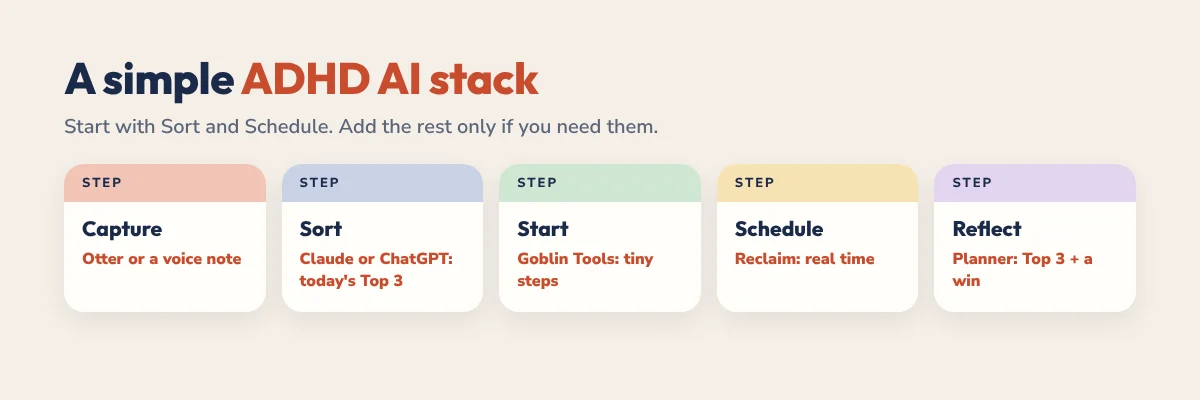
You do not need all seven tools. In fact, trying to adopt seven tools at once is the most ADHD-hostile thing you could do. Start with one. Use it for two weeks. Add the next one only when the first becomes a habit. Here are three tiers based on budget:
Best AI Tools for ADHD Adults on a Free Budget — $0/month
- Goblin Tools for instant task breakdown (no sign-up needed)
- Claude AI free plan for thinking partner and task decomposition
- Reclaim.ai free plan for basic smart scheduling
- A free hyperlinked digital planner for daily tactile planning on iPad
This free stack covers task initiation, scheduling, and daily planning. It is genuinely functional — not a stripped-down trial version of a real toolkit.
Core tier — $30/month:
- Claude Pro ($20/month) for unlimited AI assistance and task decomposition
- Reclaim.ai Starter ($10/month) for full auto-scheduling and habit tracking
- Goblin Tools (free) for quick task breakdowns
- A hyperlinked digital planner for structured daily planning
This is the sweet spot for most ADHD adults. Unlimited AI thinking partner plus automatic scheduling covers the two biggest ADHD friction points: task initiation and time management.
Full tier — $65–80/month:
- Everything in the core tier
- Otter.ai Pro ($17/month) for voice capture and meeting transcription
- Motion ($34/month) instead of Reclaim for more aggressive auto-rescheduling
- Notion AI ($10/month) if you already use Notion for project management
The principle that matters most: adopt one tool at a time. Give it two weeks. If it sticks, keep it and add the next one. If it does not, try something else without guilt. The right stack is the one you actually use — not the one that looks impressive on paper.
Frequently Asked Questions
What is the best AI tool for ADHD adults in 2026?
For most ADHD adults, Reclaim.ai is the single most impactful AI tool because it directly addresses time blindness — one of the most disruptive ADHD symptoms. It automatically schedules your tasks and protects focus time without requiring manual calendar management. For task initiation struggles specifically, Claude AI is the best choice because it breaks overwhelming tasks into concrete micro-steps your brain can actually start.
Are there free AI tools that actually help with ADHD?
Yes. Goblin Tools is completely free with no sign-up required and was designed specifically for neurodivergent brains. Its Magic ToDo feature breaks tasks into subtasks instantly. Claude AI and Reclaim.ai both have genuinely useful free plans that cover daily ADHD productivity needs. Combined with a free hyperlinked digital planner sample, you can build a complete ADHD productivity stack for zero dollars.
Can AI replace ADHD medication or therapy?
No. AI tools are productivity aids, not medical treatments. They reduce friction in daily tasks and compensate for executive function challenges, but they do not address the neurological basis of ADHD. Think of AI tools as external scaffolding — they support the structure, but they are not the foundation. If medication or therapy helps you, AI tools make that foundation even more effective. They work best together, not as replacements.
Which AI tools work best on iPad for ADHD planning?
Claude AI works well through the iPad browser for task decomposition and thinking work. Reclaim.ai is fully functional via the web on iPad. Goblin Tools works on any browser including iPad Safari. For the best iPad-first ADHD workflow, pair these AI tools with a hyperlinked digital planner in GoodNotes — the combination of AI for task breakdown and a tactile planner for daily handwritten planning creates a system that works with your brain instead of against it.
Pair These Tools with a Planner Designed for Your Brain
AI tools handle the invisible work — scheduling, task breakdown, thought capture, and organization. But your daily planning still needs a home. A hyperlinked digital planner gives you the visual structure, Apple Pencil handwriting, and instant one-tap navigation that ADHD brains need to stay engaged with their plan. No setup. No configuration. No database building. Just open it and start planning. Grab a free 85-page sample and see what friction-free planning actually feels like.