
ADHD & Executive Function
March 2026 | 7 min read
The Dopamine Menu: Use Your Digital Planner to Kickstart ADHD Motivation
For ADHD brains, motivation isn’t a switch you can flip — it’s tied to dopamine. The Dopamine Menu is a simple strategy that works with your brain’s reward system, not against it. Your hyperlinked digital planner is the perfect place to build one.
HyperPlanners
ADHD Planning Guides
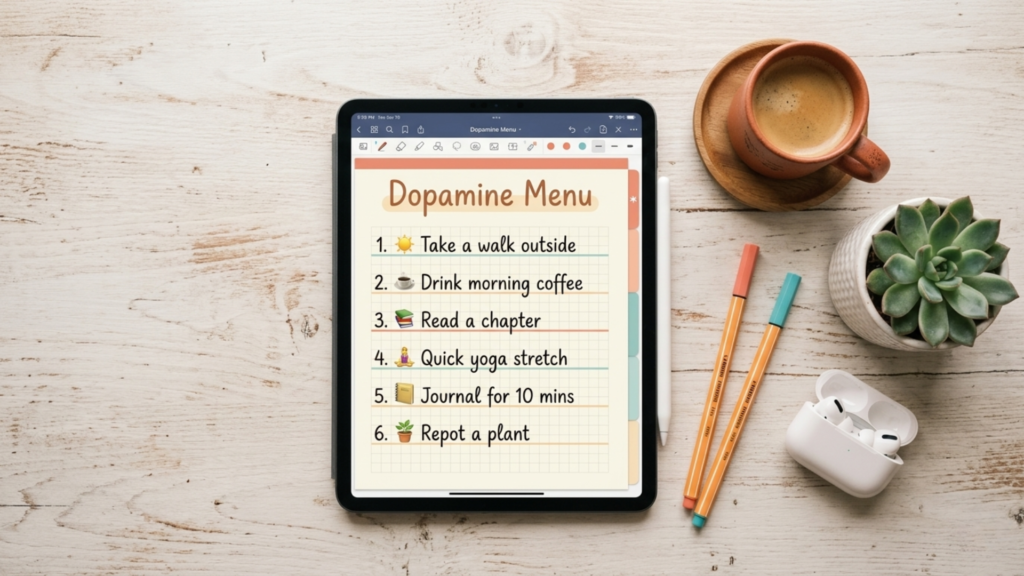
When tasks feel boring, overwhelming, or disconnected from any immediate reward, ADHD brains stall. Not from laziness — from a genuine neurological gap in dopamine. The Dopamine Menu is a way to bridge that gap deliberately.
The ADHD motivation puzzle
For many people with ADHD, motivation isn’t a straightforward switch. It’s closely tied to dopamine — the neurotransmitter that regulates reward, pleasure, and the drive to start things. When tasks feel repetitive, overwhelming, or disconnected from immediate results, dopamine levels dip and task initiation becomes genuinely difficult. This is often called ADHD paralysis.
ADHD paralysis isn’t a character flaw or a lack of effort. It’s a neurological response to low dopamine — and understanding that changes how you approach the problem entirely.
The solution isn’t trying harder. It’s giving your brain a deliberate dopamine boost first — using small, enjoyable activities to prime your reward system before you start the harder work. That’s exactly what the Dopamine Menu does.
What is a Dopamine Menu?
A Dopamine Menu is a personalised list of small, enjoyable, low-effort activities that give your brain a quick positive emotional response. These aren’t necessarily productive tasks — they’re strategic bridges. You use them to get your dopamine moving before you attempt something more demanding.
The key qualities of a good Dopamine Menu item: easy to access, short in duration, and genuinely enjoyable for you specifically. Not what you think you should enjoy — what actually makes you feel better.
Example Dopamine Menu items
One favourite song
Not a playlist — one specific song that reliably lifts your mood
A 5-minute YouTube video
Set a timer — the limit is what makes it a menu item, not a trap
A special snack or drink
Something you save for these moments — makes it feel rewarding
A short walk outside
Even 5 minutes of movement shifts dopamine and norepinephrine
A quick game on your phone
One round — choose a game that has a natural stopping point
Cuddle with a pet
Physical affection with animals is one of the fastest dopamine activators
💡Your Dopamine Menu is personal — what works for you might not work for someone else. The items should feel like small treats, not chores. If an item stops feeling rewarding, replace it.
Why your digital planner is the perfect Dopamine Menu tool
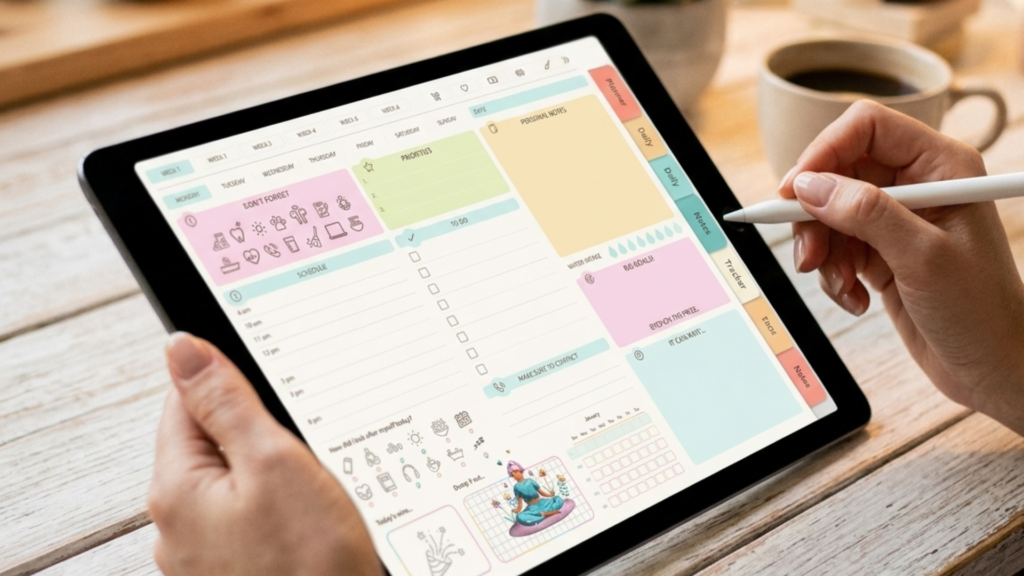
Traditional paper planners can feel rigid and overwhelming when your brain is already struggling with executive function. Hyperlinked digital planners have specific advantages that make them ideal for implementing a Dopamine Menu.
01:
Instant navigation — zero friction
With a single tap, you jump from your task list directly to your Dopamine Menu. No page flipping. No losing your place. Friction is the enemy of ADHD planning — hyperlinks eliminate it entirely.
02:
Visual cues that work with ADHD brains
Digital planners support colour-coding, stickers, and custom layouts. Your Dopamine Menu page can be visually distinct and appealing — something your brain actually wants to open rather than something that looks like a spreadsheet.
03:
Flexible — update it anytime
Activities lose their novelty. When a menu item stops working, you can update it in seconds — no messy cross-outs, no wasted pages. Your menu evolves with you.
04:
Integrated into your existing system
Your Dopamine Menu lives alongside your daily tasks, weekly schedule, and goal tracker. It becomes part of your planning system rather than a separate thing you have to remember to use.
How to build your Dopamine Menu in your digital planner
Step 1:
Identify your dopamine boosters
Dedicate a blank page in your digital planner for brainstorming. List every small, enjoyable activity that gives you a quick lift. Don’t overthink it — if it makes you smile or feel better, write it down. Aim for 10–15 items. More variety means more options when one stops working.
Step 2:
Categorise for the right moment
Group your items into categories so you can choose the right boost for the right situation. Common categories that work well for ADHD brains:
Sensory
Stimulates the senses
Music, a specific scent, a weighted blanket, a favourite texture
Movement
Gets the body involved
Stretching, a quick dance break, walking to the mailbox and back
Creative
Light creative stimulation
Not a playlist — one specific song that reliably lifts your mood
Social
Low-demand connection
A quick text to a friend, funny memes, a brief voice note
Step 3:
Create a hyperlink directly to your Dopamine Menu page
In your HyperPlanners digital planner, create a custom hyperlink from your daily or weekly view directly to your Dopamine Menu page. One tap from anywhere in the planner — no searching, no friction. This is the step most people skip and the one that makes the biggest difference.
Step 4:
Use it strategically — not randomly
Your Dopamine Menu works best when used with intention. Here are the four best moments to reach for it.
The four best moments to use your Dopamine Menu
Before a hard task
Prime your brain first
Choose one item from your menu before starting a task that feels daunting. It acts as a pre-reward, warming up your dopamine system before the effort begins.
During a break
Intentional recharging
Instead of mindlessly scrolling (which often makes ADHD worse), use a deliberate menu item. Intentional breaks recharge — passive scrolling drains.
During a break
Intentional recharging
Instead of mindlessly scrolling (which often makes ADHD worse), use a deliberate menu item. Intentional breaks recharge — passive scrolling drains.
When overwhelmed
Reset, don’t spiral
When focus is slipping or overwhelm is setting in, a quick menu item can interrupt the spiral and give your brain enough of a reset to continue.
Pro tip: In your HyperPlanners digital planner, add a dedicated “Dopamine Menu” tab alongside your daily and weekly views. That way it appears in your navigation bar on every page — exactly when you need it most.
Beyond the menu — how hyperlinked planners support ADHD
The Dopamine Menu is one strategy. But the reason a hyperlinked digital planner works so well for ADHD brains goes deeper — it’s designed to reduce the friction that makes ADHD hard in the first place.
Time blindness
Visual layouts and instant jumps to specific dates make time more concrete and navigable. ADHD time blindness improves when the structure is visible, not abstract.
Executive dysfunction
Structured templates for brain dumps, task breakdown, and goal setting provide external scaffolding — replacing the internal organisation that executive dysfunction makes difficult.
“Out of sight, out of mind”
Everything is interconnected and instantly accessible. Important tasks, notes, and pages don’t get buried — they’re always one tap away from wherever you are in the planner.
Task initiation difficulty
The Today button means zero navigation overhead at the start of each day. When starting is hard, removing every possible friction point matters — even seconds count.
Try a hyperlinked planner built for ADHD brains
One-tap Today button, dedicated daily priority section, brain dump pages, and full hyperlink navigation. 85 pages, fully hyperlinked. Normally $5.99 — free with code BLOGFREE2026.
The ADHD Planner Bundle — 6 templates, 358 pages.
Balanced Mind, Brain Dump, Productivity, Women’s ADHD, Cleaning, and Mental Health Journal. Every template fully hyperlinked and Canva editable. Designed specifically for executive function challenges.
Planner Basics
What is a Hyperlinked Planner? The Beginner’s Guide
Everything you need to know about hyperlinked planners — how they work, who they’re for, and how to get started.
Planner basics
Hyperlinked vs. Static Planners | The Full Comparison
Side-by-side breakdown of every difference. Which one is right for you?
Productivity
Five Digital Planner Habits That Actually Stick
The daily routines that turn a downloaded planner into a system you actually use.